Table of Contents
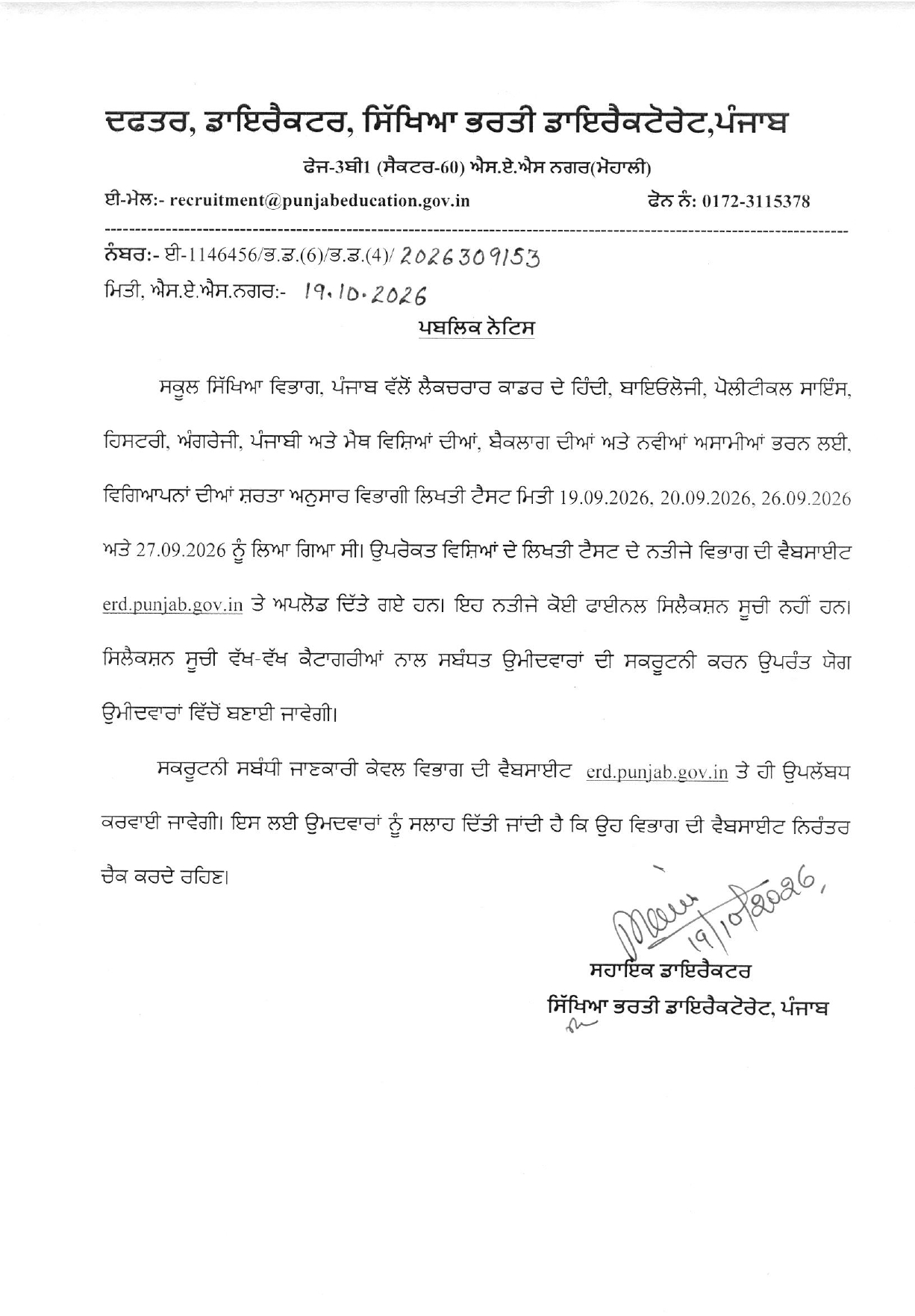
The Recruitment Directorate, Punjab has released the result of the ERD Lecturer Cadre written test on 19 October 2026. The test was held on 19, 20, 26 and 27 September 2026 for both backlog and new vacancies. Candidates can check their result on the official website, erd.punjab.gov.in. This article explains the dates, download steps, details on the scorecard, how to raise an issue, and the documents to keep ready.
ERD Punjab Lecturer Result 2026 Out
The ERD Punjab Lecturer result is now available online on erd.punjab.gov.in which is for the written test conducted for Hindi, Biology, Political Science, History, English, Punjabi and Maths. Candidates can open the result link and check whether they have qualified. Shortlisted candidates should read the official notice carefully for the next steps.
ERD Punjab Lecturer Cadre Result 2026: Overview
Here are the main details of the result at a glance. The table will help you quickly find the key facts. Please check the official website for any update.
| Particulars | Details |
|---|---|
| Organization | Recruitment Directorate, Punjab |
| Post | Lecturer (various subjects, backlog and new posts) |
| Exam Dates | 19, 20, 26 and 27 September 2026 |
| Mode of Exam | Written Test (150 marks) |
| Marking Scheme | +1 for each correct answer, no negative marking |
| Result Status | Out |
| Result Date | 19 October 2026 |
| Official Website | erd.punjab.gov.in |
| Official Email | recruitment@punjabeducation.gov.in |
| Helpline Number | 0172-3115378 |
Important Dates
Knowing the key dates helps you stay on track. The written test was held in September 2026, and the answer key came out soon after. The table below lists the main dates of this recruitment process.
| Event | Date |
|---|---|
| Written Test | 19, 20, 26 and 27 September 2026 |
| Answer Key Released | 1 October 2026 |
| Last Date to Raise Answer Key Objection | 5 October 2026, 5:00 PM |
| Result Declared | 19 October 2026 |
| Document Verification / Interview | To be announced on the official website |
ERD Punjab Lecturer Result 2026 Download Link
The result and scorecard can be downloaded from the official website. The department has shared subject-wise and shift-wise links.
| Subject | Result / Scorecard Link |
|---|---|
| Hindi | Click Here |
| Biology | Click Here |
| Political Science | Click Here |
| History | Click Here |
| English | Click Here |
| Punjabi | Click Here |
| Maths | Click Here |
How to Download the ERD Punjab Lecturer Result PDF?
Downloading the result is simple and takes only a few minutes. You need your roll number or login details. Follow the steps below.
- Visit the official website, erd.punjab.gov.in
- Look for the link named “Lecturer Cadre Result 2026”
- Click on the link for your subject and shift
- The result will open as a PDF on your screen
- Search for your roll number in the PDF
- Download and save the PDF, and take a printout for later
Details Mentioned in the ERD Punjab Lecturer Cadre Result 2026
The result and scorecard carry important details about you and your performance. Please check each detail carefully after downloading. If you find any mistake, report it to the department quickly.
- Candidate’s name and roll number
- Subject and exam session (morning or evening)
- Category (General, SC, BC, EWS, etc.)
- Marks obtained out of 150
- Qualifying status
- Cut-off marks [add from official notice
- Instructions for the next stage
What Next After the ERD Punjab Lecturer Cadre Result 2026?
The Punjab Lecturer Cadre Result 2026 is out, but this is not the final selection list. The department has said the selection list will be prepared from eligible candidates after scrutiny of candidates in the different categories. So the result is only the first step. Here is what you should do next.
1. Check your result and save a copy
Open the result PDF for your subject and shift on erd.punjab.gov.in. Find your roll number, check your marks, and save the PDF. Take a printout too, as you may need it later.
2. Check your details
Make sure your name, roll number, category and marks are correct. If you find a mistake, contact the department through the official email (recruitment@punjabeducation.gov.in) or helpline (0172-3115378).
3. Wait for the scrutiny update
The department will check candidates category-wise before preparing the selection list. All scrutiny information will be shared only on the official website, so do not rely on unofficial sources.
4. Keep your documents ready
Candidates may be asked to show their documents during scrutiny. Keep the originals and photocopies of these ready:
- Result or scorecard printout
- Admit card of the written test
- Application form printout
- Photo ID proof (Aadhaar, PAN, Voter ID, etc.)
- Class 10 certificate (for date of birth)
- Graduation and Post-Graduation mark sheets and degrees
- B.Ed. certificate and other qualification proof
- Category certificate (SC / BC / EWS), if applicable
- Recent passport-size photographs
5. Prepare for the later stages
As per the recruitment process, the selection stages are the written exam, interview, document verification and medical examination. Candidates who clear the scrutiny can start preparing for the interview and getting their documents and medical fitness in order.
6. Check the official website regularly
The department has advised candidates to keep checking erd.punjab.gov.in for the scrutiny schedule, selection list and other notices. The exact dates have not been announced yet.
Document Verification (DV) Checklist
Qualified candidates will be called for document verification. The exact list will be given in the official notice, so check it carefully. Keep both original documents and photocopies ready. The usual documents are listed below.
- Result or scorecard printout
- Admit card of the written test
- Application form printout
- Photo ID proof (Aadhaar, PAN, Voter ID, etc.)
- Class 10 certificate (for date of birth)
- Graduation and Post-Graduation mark sheets and degrees
- B.Ed. certificate and other required qualification proof
- Category certificate (SC / BC / EWS), if applicable
- Recent passport-size photographs
- Any other document asked in the official notice



 UP LT Grade Mains Result 2026 Out, Check...
 UPESSC Principal Result 2026 Out, Downlo...
 RPSC 2nd Grade Teacher Result 2026 Out (...