
Table of Contents
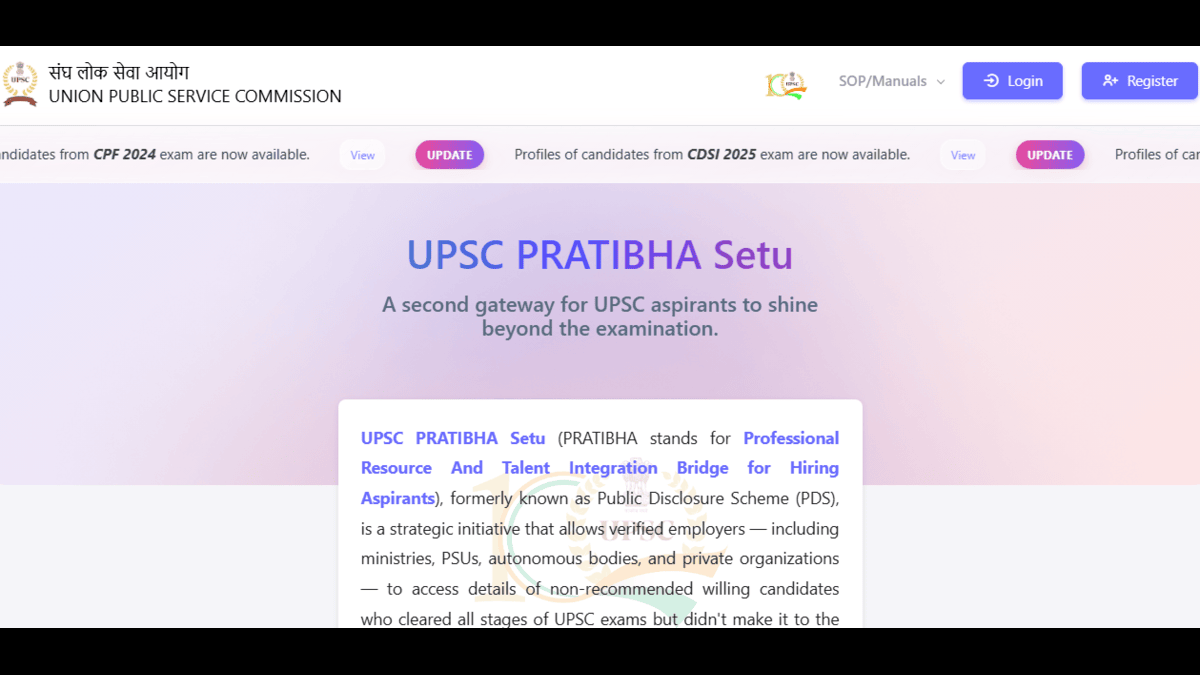
The UPSC Pratibha Setu Portal (Professional Resource And Talent Integration Bridge for Hiring Aspirants) is a recruitment initiative launched by the Union Public Service Commission (UPSC). It enables government organizations, PSUs, autonomous bodies, and registered private companies to connect with talented UPSC candidates who cleared all stages of eligible examinations but were not included in the final merit list.
Earlier known as the Public Disclosure Scheme (PDS), the initiative has evolved into a dedicated online portal that helps organizations identify and recruit highly qualified candidates through a secure digital platform.
UPSC Pratibha Setu Portal: Highlights
| Particular | Details |
|---|---|
| Portal Name | UPSC Pratibha Setu |
| Full Form | Professional Resource And Talent Integration Bridge for Hiring Aspirants |
| Earlier Name | Public Disclosure Scheme (PDS) |
| Launched By | Union Public Service Commission (UPSC) |
| Objective | Connect UPSC-qualified candidates with employers |
| Registration Mode | Online |
| Eligible Organizations | Ministries, PSUs, Autonomous Bodies & Registered Private Companies |
| Official Portal | https://upsconline.gov.in/miscellaneous/pdoiac/index.php |
What is UPSC Pratibha Setu?
UPSC Pratibha Setu is a talent-sharing platform that provides verified employers with access to the profiles of candidates who:
- Qualified the UPSC written examination.
- Cleared the interview stage.
- Were not recommended in the final merit list.
- Voluntarily agreed to share their profiles for employment opportunities.
Key Features of UPSC Pratibha Setu
| Feature | Description |
|---|---|
| Talent Pool | Access to 10,000+ willing UPSC candidates |
| Easy Registration | CIN-based online registration |
| Employer Dashboard | Search, shortlist and manage candidates |
| Candidate Profiles | Educational qualifications and contact details |
| Recruitment Workflow | Wishlisting, selection and reporting |
| Support System | Documentation, manuals and ticketing support |
Who Can Register on UPSC Pratibha Setu?
The following organizations are eligible to register:
| Organization | Eligible |
|---|---|
| Central Government Ministries | Yes |
| State Government Departments | Yes |
| Public Sector Undertakings (PSUs) | Yes |
| Autonomous Bodies | Yes |
| Statutory Organizations | Yes |
| Registered Private Companies (with CIN) | Yes |
UPSC Pratibha Setu Registration Process
Follow these steps to register on the portal:
| Step | Process |
|---|---|
| Step 1 | Visit the UPSC website and open the Examination menu. |
| Step 2 | Click on UPSC Pratibha Setu. |
| Step 3 | Open the registration portal. |
| Step 4 | Click Register. |
| Step 5 | Enter the Corporate Identification Number (CIN). |
| Step 6 | Click Verify. |
| Step 7 | Enter the OTP received on the MCA-registered email. |
| Step 8 | Complete the Nodal Officer Registration form. |
| Step 9 | Verify the OTP sent to the Nodal Officer’s email and mobile number. |
| Step 10 | Registration is completed and the dashboard becomes accessible. |
UPSC Pratibha Setu Login Process
After successful registration, organizations can log in by following these steps:
- Visit the UPSC Pratibha Setu Portal.
- Click Login.
- Enter your registered credentials.
- Complete the verification process.
- Access the employer dashboard.
Dashboard Features
Registered organizations can use the dashboard to:
- View notifications and updates.
- Search candidate profiles.
- Create wishlists.
- Shortlist candidates.
- Mark candidates as selected or rejected.
- Generate reports.
Candidate Information Available on the Portal
Registered employers can access the following details:
| Information | Available |
|---|---|
| Candidate Biodata | Yes |
| Educational Qualifications | Yes |
| Contact Details | Yes |
| Examination Details | Yes |
| Candidate Profile | Yes |
Benefits of UPSC Pratibha Setu
| For Employers | For UPSC Aspirants |
|
|
Why Was UPSC Pratibha Setu Introduced?
The portal was introduced to ensure that talented candidates who narrowly missed final selection still receive employment opportunities.
- Connect deserving UPSC aspirants with employers.
- Improve employment opportunities for qualified candidates.
- Help organizations recruit highly skilled professionals.
- Reduce recruitment time through a verified talent database.
- Create a bridge between UPSC talent and industry.
Evolution from Public Disclosure Scheme (PDS)
| Public Disclosure Scheme (Earlier) | UPSC Pratibha Setu (Current) |
|---|---|
| Candidate list published online | Dedicated recruitment portal |
| Basic public disclosure | Secure employer login |
| Limited interaction | Dashboard-based recruitment |
| Manual access | Search, shortlist and recruit candidates |
The Public Disclosure Scheme (PDS) was launched on 20 August 2018 following a decision of the Department of Personnel & Training (DoPT). The first list published under the scheme included candidates from the Combined Medical Services Examination, 2017. It has since been renamed UPSC Pratibha Setu with enhanced digital features.
Examinations Covered Under UPSC Pratibha Setu
| Examination | Status |
|---|---|
| Civil Services Examination | Included |
| Indian Forest Service Examination | Included |
| Central Armed Police Forces (ACs) Examination | Included |
| Engineering Services Examination | Included |
| Combined Geo-Scientist Examination | Included |
| Combined Defence Services (CDS) Examination | Included |
| Indian Economic Service (IES) Examination | Included |
| Indian Statistical Service (ISS) Examination | Included |
| Combined Medical Services (CMS) Examination | Included |
| NDA & NA Examination | Not Covered |
| CBI (DSP) LDCE | Not Covered |
| CISF AC (EXE) LDCE | Not Covered |
| SO/Steno (GE-B/GD-I) LDCE | Not Covered |
Key Features of UPSC Pratibha Setu
| Feature | Description |
|---|---|
| Talent Pool | Access to 10,000+ willing UPSC candidates |
| Easy Registration | CIN-based online registration |
| Employer Dashboard | Search, shortlist and manage candidates |
| Candidate Profiles | Educational qualifications and contact details |
| Recruitment Workflow | Wishlisting, selection and reporting |
| Support System | Documentation, manuals and ticketing support |
Who Can Register on UPSC Pratibha Setu?
The following organizations are eligible to register:
| Organization | Eligible |
|---|---|
| Central Government Ministries | Yes |
| State Government Departments | Yes |
| Public Sector Undertakings (PSUs) | Yes |
| Autonomous Bodies | Yes |
| Statutory Organizations | Yes |
| Registered Private Companies (with CIN) | Yes |
UPSC Pratibha Setu Registration Process
Follow these steps to register on the portal:
| Step | Process |
|---|---|
| Step 1 | Visit the UPSC website and open the Examination menu. |
| Step 2 | Click on UPSC Pratibha Setu. |
| Step 3 | Open the registration portal. |
| Step 4 | Click Register. |
| Step 5 | Enter the Corporate Identification Number (CIN). |
| Step 6 | Click Verify. |
| Step 7 | Enter the OTP received on the MCA-registered email. |
| Step 8 | Complete the Nodal Officer Registration form. |
| Step 9 | Verify the OTP sent to the Nodal Officer’s email and mobile number. |
| Step 10 | Registration is completed and the dashboard becomes accessible. |
Dashboard Features
Registered organizations can use the dashboard to:
- View notifications and updates.
- Search candidate profiles.
- Create wishlists.
- Shortlist candidates.
- Mark candidates as selected or rejected.
- Generate reports.








 UP TGT PGT Syllabus 2026 Out, Download S...
 UP TGT PGT Eligibility Criteria 2026, Ag...
 UGC NET 2026 Notification Out, Check App...