Table of Contents
The Teachers Recruitment Board (TRB), Tamil Nadu, has released the TNTET Exam E Certificate Download link on its official website www.trb.tn.gov.in. Candidates who qualified for the TNTET exam can now complete their TN TET certificate download process online. The TNTET Result 2025-26 was declared on 31 January 2026 for over 4.24 lakh candidates who appeared for the examination. With the result already out, the eligibility certificate is the next and most crucial document for candidates aiming to secure teaching jobs in government and aided schools across Tamil Nadu.
TNTET Exam E Certificate Download
The TNTET 2025 examination was conducted on 15 and 16 November 2025, and, as per reports, 92,412 candidates appeared for Paper I, while 3,31,923 appeared for Paper II. From 02 February 2026, all qualified candidates can complete their TNTET Exam E Certificate Download through the official TRB portal. The TN TET e certificate download is available in PDF format and remains valid for a lifetime. The certificate includes key details such as the candidate’s name, roll number, paper qualified, exam date, and qualifying marks.
TN TET E Certificate Download 2026: Overview
The Tamil Nadu Teacher Eligibility Test is a state-level exam conducted to determine eligibility for teaching posts in Primary (Classes 1-5) and Upper Primary (Classes 6-8) schools. Only TNTET Paper 1 or Paper 2 qualified candidates are issued the eligibility certificate in PDF format.
| TNTET Exam E Certificate Download | |
| Exam Name | Tamil Nadu Teacher Eligibility Test (TNTET) |
| Conducting Authority | Teachers Recruitment Board (TRB), Tamil Nadu |
| Certificate Name | TNTET Certificate 2026 |
| Exam Level | State Level |
| Exam Purpose | Eligibility for teaching posts in Tamil Nadu |
| Classes Covered | Classes 1–5 (Paper 1), Classes 6–8 (Paper 2) |
| TNTET Exam Date | 15 & 16 November 2025 |
| TNTET Result Date | 31 January 2026 |
| TNTET Certificate Release Date | 02 February 2026 |
| Mode of Certificate | Online (PDF Format) |
| Official Website | trb.tn.gov.in |
| Login Credentials Required | Service Name and Application Number |
| TNTET Result 2026 Out | Released |
| Certificate Validity | Lifetime |
| Applicable Schools | Government and Aided Schools in Tamil Nadu |
What is the TNTET Certificate 2026?
The TNTET E Certificate 2026 is an official digital eligibility document issued by the Tamil Nadu Teachers Recruitment Board after the TNTET result 2025 e certificate declaration. It certifies that the candidate is eligible to apply for teaching positions in government and aided schools in Tamil Nadu for Classes I to VIII, depending on the papers passed. It is important to note that qualifying for TNTET does not guarantee a job. Instead, it makes candidates eligible to participate in teacher recruitment exams conducted by the Tamil Nadu government.
TNTET Exam E Certificate Download PDF
The Tamil Nadu Teachers Recruitment Board (TNTRB) has activated the TNTET Exam E Certificate Download link on its official website. Candidates must log in using their Service Name and Application Number to access the certificate. This digital certificate should be downloaded and saved carefully, as it will be required during document verification and future recruitment processes.
TNTET Certificate Download 2025 Link (Active)
How To Download the TNTET Certificate 2026?
Candidates can follow the steps below to download their TNTET eligibility certificate without any difficulty:
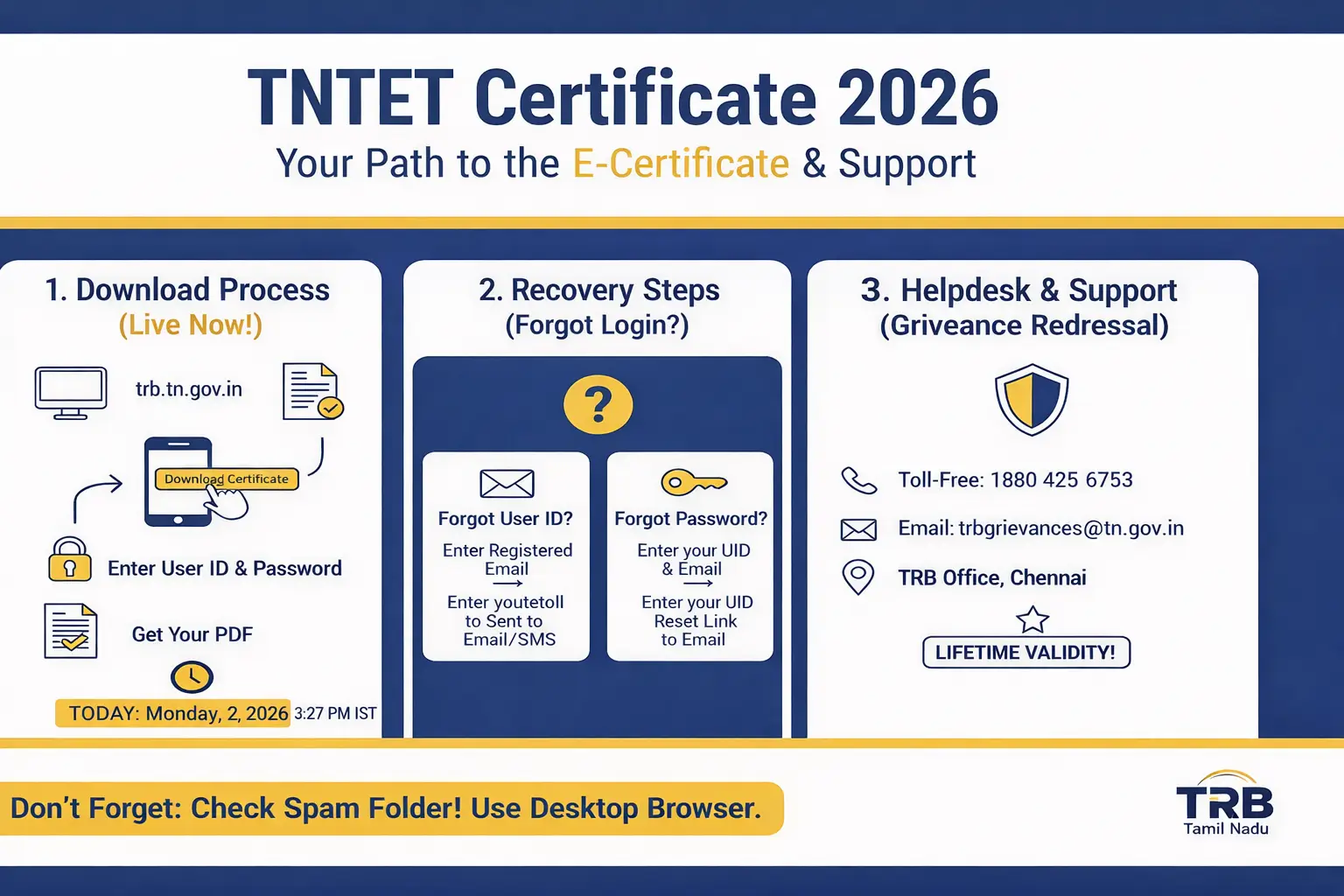
- Visit the official website www.trb.tn.gov.in to start your TNTET exam e certificate download process.
- On the homepage, click on the link titled “Click Here for TN TET Certificate Download 2026 Link”.
- You will be redirected to the login page.
- Enter your Service Name and Application Number, then click on the Send button.
- The TNTET E Certificate 2026 will appear on the screen.
- Download the PDF and take a printout for future reference.

How to Recover TNTET Login ID or Password?
Follow these steps incase your forgot your application ID and Password. Just visit the official website, then follow these:
| Issue | How to Fix | Result |
| Forgot User ID | Click Forgot User ID ➔ Enter Registered Email | ID sent to your Email/SMS |
| Forgot Password | Click Forgot Password ➔ Enter User ID & Email | Reset link sent to Email |
| Email/Mobile Lost | Contact TRB Helpdesk with ID Proof | Manual recovery by the Board |
Unable to Download TNTET E Certificate? Check Solutions
If you are facing issues while downloading the TNTET E Certificate, follow these steps:
- Course Completion: If you are a final-year student, you must submit your final degree certificate or provisional certificate to TRB to activate (unlock) your digital certificate.
- Duplicate Certificate: If you lose your original E Certificate, you can download it again from the dashboard. But if you want an official duplicate copy from the office, you must pay ₹100.
- Browser Issue: Because the TRB website has heavy traffic, clear your browser history or try downloading the certificate after 10:00 PM today.
Details to Verify on Your Certificate
After downloading the certificate, candidates must verify all details carefully. If any discrepancy is found, candidates should immediately contact TNTRB for correction. The following information should be checked:
- Name of the Exam Conducting Body
- Examination Name
- Certificate Number
- Candidate’s Name
- Roll Number
- Date of Birth
- Paper Qualified (Paper 1 or Paper 2)
- Optional Language
- Date of Issue
- Place of Issue
- Signature of Member (TET), Teacher Recruitment Board
| What if I find an error? |
| If you find any error in your name, category, or photograph on the e-certificate, contact the TN TRB helpdesk immediately via their official email or helpline provided on the portal. |
How to Download Duplicate TNTET Exam Certificate?
Candidates who failed to download their TNTET certificate within the active period must apply for a duplicate certificate through offline mode. Here is the process:
- Fill out the prescribed application form for a duplicate TNTET E certificate.
- Pay a fee of Rs. 100/- via Demand Draft in favour of the Teachers Recruitment Board.
- Attach a copy of the TNTET admit card and required documents.
- Send the application, DD, and documents to the Teachers Recruitment Board office within the stipulated time.
- After verification, the duplicate TNTET E certificate will be sent to the candidate’s registered email ID.
What After TNTET Certificate Download 2026?
After downloading your TNTET (Tamil Nadu Teacher Eligibility Test) certificate for 2026, here’s what you can do next with it:
- 📄 Download & Save Certificate
- ⏳ Lifetime Validity
- 📝 Document Verification Ready
- 📢 Apply for Teaching Jobs
- 🏫 Eligibility, Not Government Job Guarantee
- 🌐 Check TRB Notifications Regularly
- 💾 Upload to DigiLocker (Optional)
- 🎓 Improve Career Opportunities






 UGC NET and CSIR UGC NET Exam Dates 2026...
 Kerala SET Question Paper 2026 Out (Unof...
 KTET Preparation Tips 2026, Online Prepa...