Table of Contents
The Pavitra Portal serves as the official recruitment gateway for Maharashtra’s Shikshak Bharti drive, run by the state government. Candidates seeking Primary or Secondary teacher posts in Zilla Parishad and municipal schools must complete their application through this portal. Every stage of the recruitment, from registration to document verification and final appointment, is managed on this single online platform. Skipping Pavitra Portal Registration 2026 rules a candidate out of the selection process entirely.
Pavitra Portal Registration 2026
Candidates applying through the Pavitra Portal 2026 should know that all vacancies will not be filled only on the basis of merit. Out of the total 30,209 vacancies, 19,881 posts will be filled directly based on merit, while 10,328 posts will be filled through interviews. These vacancies are open to candidates who qualified in the TAIT 2025 exam, which was conducted from 27 May to 5 June 2025.
Pavitra Portal 2026: Key Overview
| Feature | Details |
|---|---|
| Portal Name | Pavitra Portal (PAVITRA) |
| Authority | School Education & Sports Department, Government of Maharashtra |
| Recruitment Target | Primary, Secondary, and Higher Secondary Teachers (Shikshak Bharti) |
| Application Mode | Online |
| MAHA TAIT Result 2026 | Check Here |
| Mandatory Exam | TAIT (Teacher Aptitude and Intelligence Test), TET, or CTET |
| Notice | Download PDF |
| Official Website | edustaff.maharashtra.gov.in |
What is Pavitra Portal?
The Pavitra Portal is an initiative of the School Education and Sports Department, Government of Maharashtra. It was introduced to streamline teacher recruitment and eliminate manual processes.
Through this portal, candidates can complete registration, upload documents, verify eligibility, submit school and district preferences, and download appointment orders. The entire system runs on merit, ensuring a fair and transparent selection process across the state.
Eligibility Criteria for PAVITRA Portal Registration
Before you register on the PAVITRA Portal, make sure you meet the required eligibility criteria.
1. Educational Qualification
Your educational qualification depends on the teaching position you are applying for.
- Primary Teacher (Classes 1 to 5):
- D.El.Ed. or D.Ed.
- Qualified MAHA TET or CTET Paper I
- Upper Primary Teacher (Classes 6 to 8):
- Bachelor’s Degree
- D.El.Ed. or B.Ed.
- Qualified MAHA TET or CTET Paper II
- Secondary and Higher Secondary Teacher (Classes 9 to 12):
- Bachelor’s Degree or Postgraduate Degree
- B.Ed. or M.Ed.
2. TAIT Score
To apply through the PAVITRA Portal, you must have a valid TAIT (Teacher Aptitude and Intelligence Test) roll number and score.
3. Domicile and Reservation Documents
Keep the following documents ready, if applicable:
- Maharashtra Domicile Certificate (required for state reservation benefits)
- Valid Category Certificate
- EWS (Economically Weaker Section) Certificate
- Non-Creamy Layer Certificate
- Disability Certificate (if applicable)
Meeting these eligibility requirements will help you complete your PAVITRA Portal registration smoothly and apply for Maharashtra teacher recruitment without any issues.
Pavitra Portal Registration Link Active
| Category | Posts |
|---|---|
| District Councils (Zilla Parishad) | 13,351 |
| Municipal Corporations | 1,954 |
| Municipalities | 280 |
| Private Institutions | 12,148 |
| Tribal Development Department Schools | 2,421 |
| Government Vidyaniketan Schools | 56 |
| Total | 30,210 |
Documents Required for Pavitra Portal Registration 2026
Keep the following documents ready before starting the registration process:
- Aadhaar Card
- TAIT Scorecard & Hall Ticket / Roll Number
- MAHA TET or CTET Scorecard (if applicable) SSC (10th) and HSC (12th)
- Marksheet & Passing Certificate
- Degree/Post-Graduation Certificates
- Professional Qualification Marksheets (D.Ed / D.El.Ed / B.Ed / M.Ed)
- Maharashtra Domicile Certificate
- Caste Certificate, Caste Validity Certificate, or EWS Certificate (if applicable)
- Recent Passport-Size Photograph & Scanned Signature
How to Do Pavitra Portal Registration 2026?
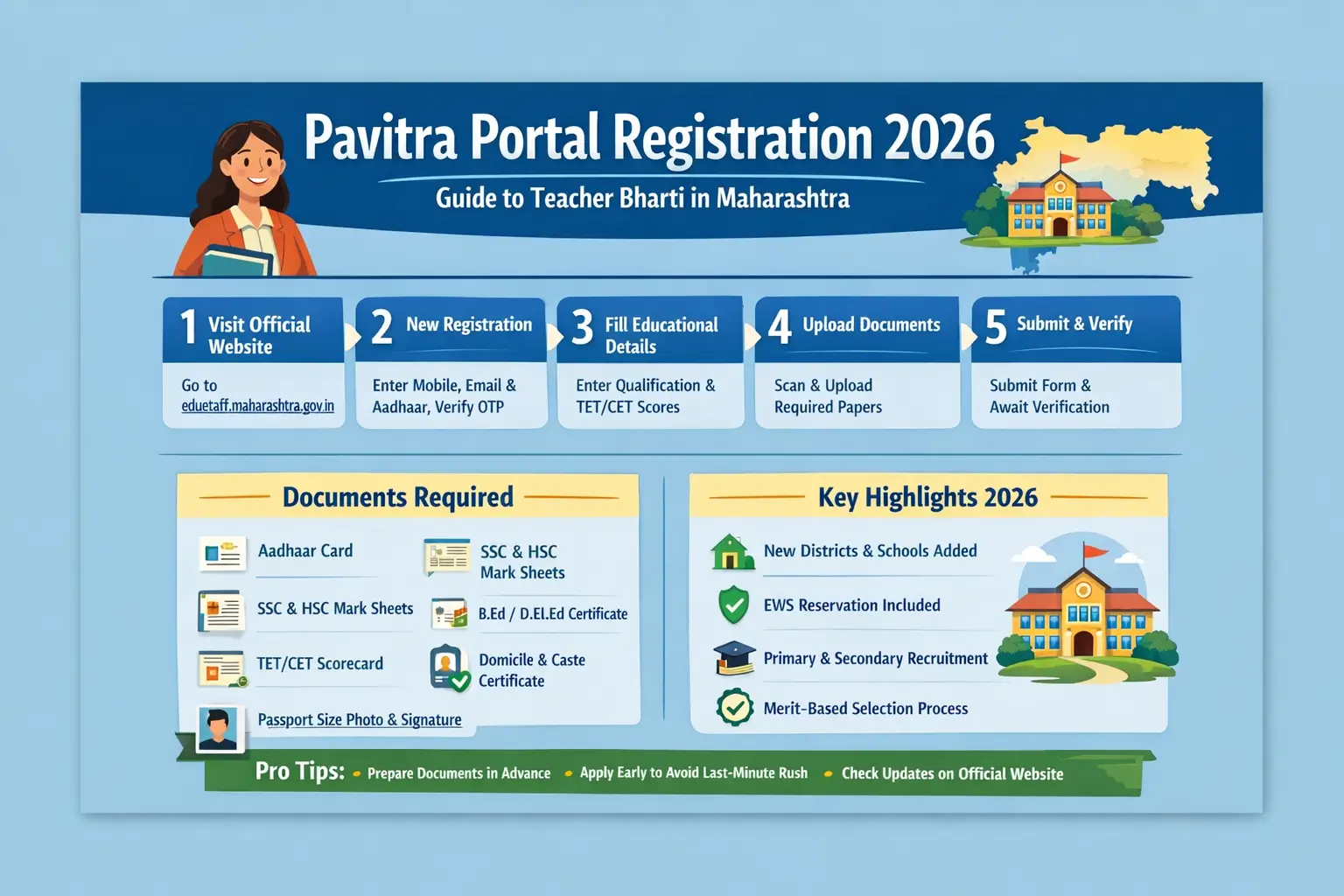
Check out the step-by-step guide to use the Pavitra Portal Registration 2026 as mentioned in the following section.
- Step 1: Visit the Official Website. Go to the official portal at edustaff.maharashtra.gov.in and click on the “Pavitra Portal” link available on the homepage.
- Step 2: Complete New Registration. Select the “New Registration” option and enter your mobile number, email ID, and Aadhaar number. Verify the OTP sent to your registered mobile number and create a password. Once verified, the system generates your unique candidate ID.
- Step 3: Fill in Educational and Exam Details. Log in using your Candidate ID and password. Enter your academic qualifications, such as SSC, HSC, graduation, and professional teaching degrees like B.Ed or D.El.Ed. You also need to provide valid TET or CET scores, as applicable.
- Step 4: Upload Documents. Upload scanned copies of all required documents in the prescribed format and file size. Make sure the details match exactly with your certificates to avoid rejection during verification.
- Step 5: Final Submission and Verification. Submit the application and wait for official scrutiny. Once your documents are verified, you become eligible to apply for district-wise and school-wise vacancies released under Teacher Bharti 2026.
How to Log In for Registered Candidates?
If you have already created an account on the portal, log in directly by following these steps:
- Go to edustaff.maharashtra.gov.in.
- Click on “Pavitra Portal Login.”
- Select Candidate Login from the user role menu.
- Input your User ID, Password, and the Captcha Code.
- Click Submit to view your dashboard, track e-verification status, or modify preferences.
Important Tips for Candidates Using Pavitra Portal
Prepare scanned documents in advance to avoid last-minute issues. Try to complete registration early, as the portal often experiences heavy traffic close to deadlines. Regularly check the official website for updates and notifications. If you forget your password, use the “Forgot Password” option to reset it easily.






 UGC NET 2026 Notification Out, Check App...
 BPSC TRE 4.0 Recruitment 2026, Over 9 La...
 GPSTR Apply Online Link 2026 Active, Reg...