Table of Contents
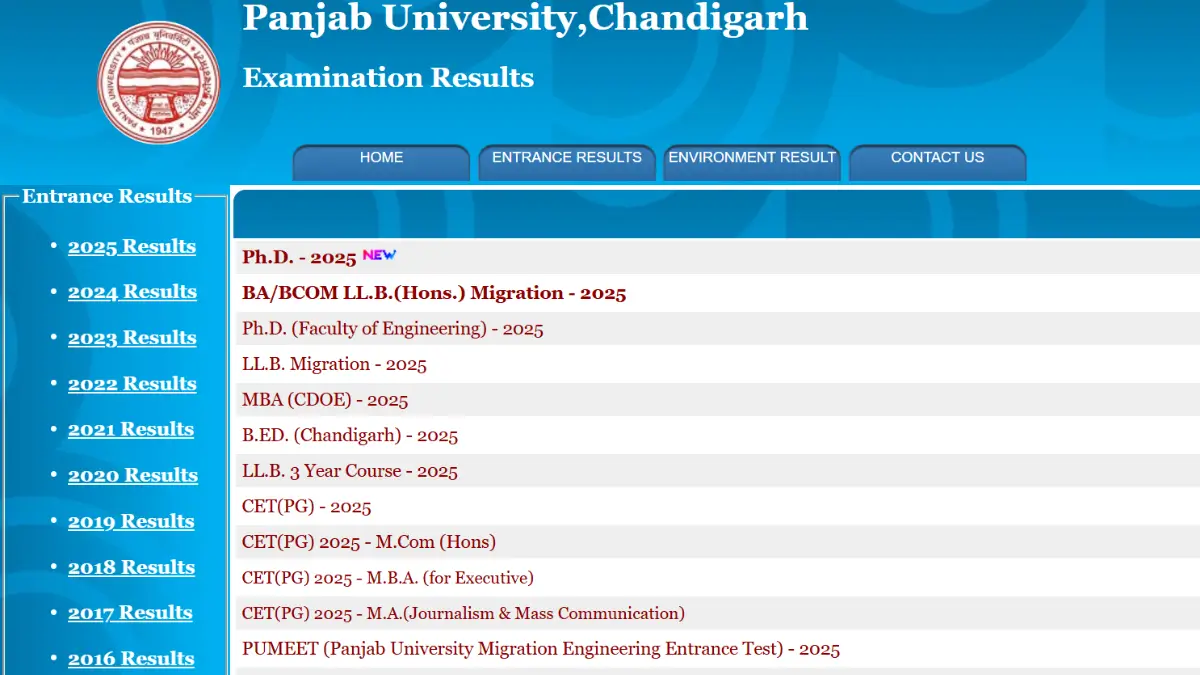
Panjab University has officially released the M.Sc 1st Semester and B.Com 5th Semester results for the 2026 academic session on March 12, 2026. Students who appeared in the December 2025 examinations can now check and download their results from the official website at puchd.ac.in. The result PDFs are available for immediate download using registration credentials.
Panjab University Result 2026 Out
The Panjab University examination authority has activated the result portal for M.Sc 1st Semester and B.Com 5th Semester examinations held in December 2025. The results were published on March 12, 2026, at approximately 4:40 PM. Students can now view their provisional mark sheets online at puchd.ac.in. All students are advised to verify their details carefully after downloading the result PDF.
PU Result 2026: Key Highlights
Panjab University (PU), Chandigarh, has declared the odd semester results for various undergraduate (UG) and postgraduate (PG) courses on its official examination portal. The results have been released for examinations conducted in December 2025 across multiple disciplines. Below are the Key Highlights of Panjab University Result 2026:
| Panjab University Result 2026: Key Highlights | |
|---|---|
| Particulars | Details |
| University Name | Panjab University, Chandigarh |
| Result Status | Declared |
| Exam Name | M.Sc 1st Semester & B.Com 5th Semester Examinations |
| Courses | M.Sc (Mathematics), B.Com, and other UG/PG courses |
| Academic Session | 2026 |
| Examination Conducted | December 2025 |
| Result Declared On | March 12, 2026 |
| Official Website | puchd.ac.in |
| Documents Required | Registration Number, Date of Birth |
| Result Type | Provisional (for immediate reference) |
PU Result 2026 PDF Download Link
Panjab University has provided direct links for students to access their results quickly. For your convenience, below is the PU Result 2026 download link to access your result directly:
Download Link of Panjab University Result 2026
How to Download PU Result 2026 PDF?
Downloading your PU Result 2026 is a simple process. The university has designed a user-friendly examination portal that allows students to access their results within minutes. All you need is a stable internet connection, your registration number, and your date of birth to view and download your mark sheet. Follow the step-by-step instructions provided below to check your result:
- Step 1: Visit the official Panjab University website at puchd.ac.in using any web browser.
- Step 2: Navigate to the ‘Examination’ section on the homepage and click on ‘Results’.
- Step 3: Select your program category (UG/PG) from the available options on the results page.
- Step 4: Choose your specific course (M.Sc 1st Semester, B.Com 5th Semester, etc.) from the list of declared results.
- Step 5: Enter your Registration Number or Roll Number in the designated input field.
- Step 6: Provide your Date of Birth as per your admission records in the required format.
- Step 7: Click on the ‘Submit’ or ‘View Result’ button to display your provisional mark sheet on screen.
- Step 8: Check all details carefully, including name, roll number, subject-wise marks, and overall grades.
- Step 9: Download the result PDF by clicking the ‘Download’ or ‘Print’ button available on the page.
- Step 10: Save the PDF securely and take multiple printouts for future academic and official reference.
Details Mentioned in the Panjab University Result 2026
The Panjab University Result 2026 available online includes all essential details required for immediate verification and reference. Students should carefully check every detail mentioned on the mark sheet to ensure accuracy.
- Student’s Full Name: As per university admission records.
- Roll Number/Registration Number: Unique identification assigned during enrollment
- Father’s Name/Mother’s Name: Parent or guardian details as per records
- Course Name: Program enrolled (M.Sc, B.Com, BSc, MBA, etc.)
- Semester/Year: Specific semester for which results are declared
- Examination Session: December 2025
- College/Department Name: Affiliated college or university department
- Subject Names/Paper Codes: All subjects/papers appeared in the examination
- Theory Marks: Marks obtained in theory papers
- Practical Marks: Marks secured in practical examinations (if applicable)
- Internal Assessment Marks: Continuous assessment scores
- Maximum Marks: Total marks allocated for each subject
- Total Marks Obtained: Aggregate marks across all subjects
- Percentage: Overall percentage scored in the semester
- Grade/CGPA: Cumulative Grade Point Average (if applicable)
- Division/Classification: First Division, Second Division, etc.
- Result Status: Pass/Fail/Compartment/Reappear/Absent
- Date of Declaration: Official result announcement date.
What’s Next After the PU Result 2026?
After checking your Panjab University Result 2026, it is important to take appropriate follow-up actions based on your performance. Whether you have passed with excellent grades or need to reappear in certain subjects, the next steps are crucial for your academic and professional journey:
- Download and save multiple copies of the provisional result PDF for records.
- Collect the original mark sheet from your college/department as per the announced schedule.
- Verify all personal and academic details on the mark sheet for any discrepancies.
- Report any errors immediately to the examination department for timely correction.
- Register for the next semester examinations within the stipulated timeline.
- Pay the semester fees and complete enrollment formalities before the deadline.
- Attend orientation sessions or classes for the upcoming semester as scheduled.
- Keep the mark sheet safe for scholarship, internship, or placement applications.
- Update your academic profile on job portals and LinkedIn if applicable.


 UPTET 2026 Notification Out, Check Exam ...
 NVS Contractual Recruitment 2026 for Tea...
 DCDC Punjabi University Faculty Recruitm...