Table of Contents
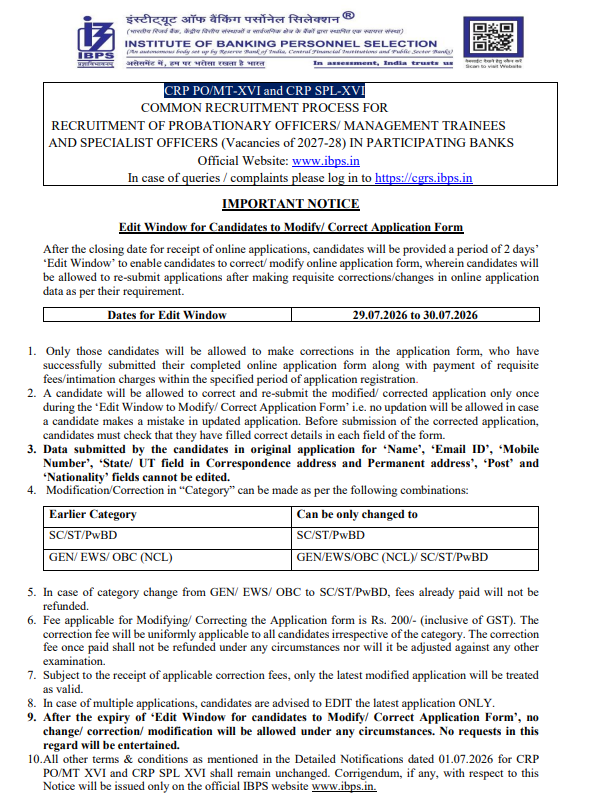
The Institute of Banking Personnel Selection (IBPS) has activated the IBPS PO Application Correction Window 2026 from 29 July to 30 July 2026 for candidates who have already submitted their application forms. During this period, applicants can review and modify the permitted details in their submitted IBPS PO application through the official website.
Candidates are advised to make all necessary corrections before the correction window closes on 30 July 2026, as no further opportunity will be provided after the deadline.
IBPS PO Application Correction 2026
The Correction Window is available for candidates who successfully completed the online application process under CRP PO/MT-XVI. This facility allows applicants to rectify errors in eligible fields of the application form before the recruitment process moves to the next stage. Candidates should carefully verify all information and make corrections only where permitted by IBPS.
IBPS PO Apply 2026: Overview
| Particular | Details |
| Exam Name |
IBPS PO 2026 (CRP PO/MT-XVI)
|
| Conducting Body |
Institute of Banking Personnel Selection (IBPS)
|
| Post |
Probationary Officer (PO)/Management Trainee
|
| Vacancy | 7365 |
| Application Mode | Online |
| Apply Online Dates | 1 to 26 July 2026 (Extended) |
| Applications Received Till 21 July | 1043956 |
| Selection Process |
Prelims, Mains, Interview
|
| Official Website | www.ibps.in |
IBPS PO Application Important Dates 2026
| Events | Dates |
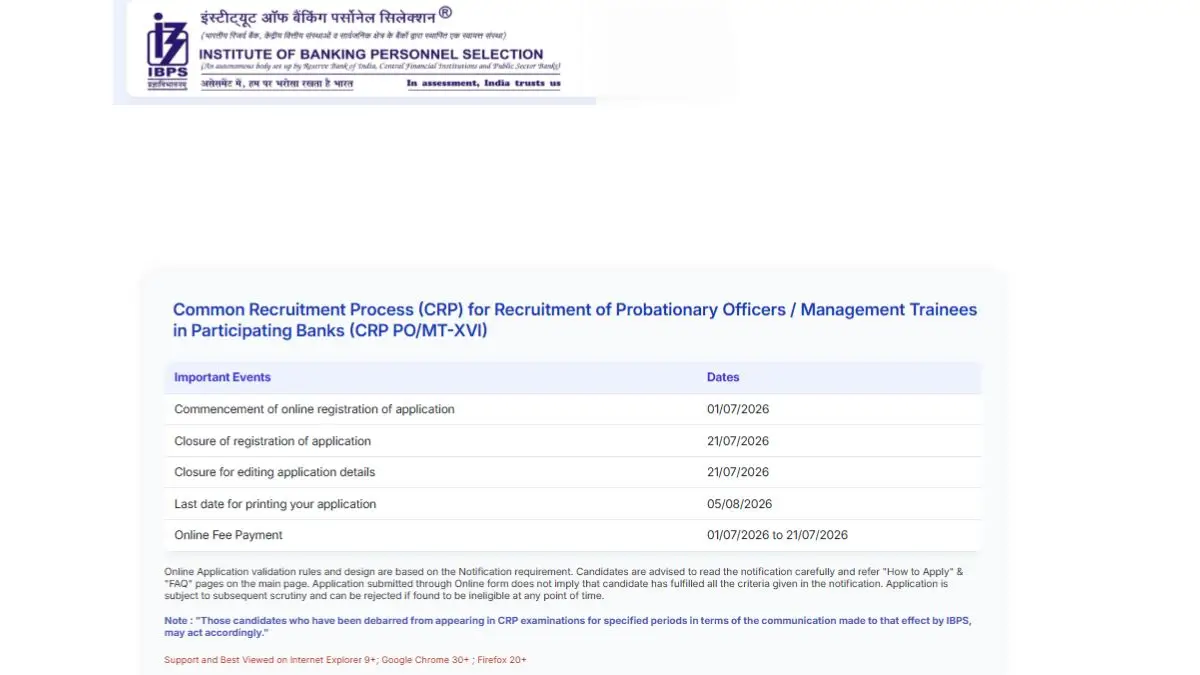
| Apply Online Started | 1st July 2026 |
| Last Date to Apply and Pay Fee | 26th July 2026 (Extended) |
| Last Date for printing Application | 5th August 2026 |
| Application Correction Window | 29 to 30 July 2026 |
| Prelims Exam |
22 & 23 August 2026
|
| Mains Exam | 4 October 2026 |
IBPS PO Application Correction Link 2026
IBPS has activated the online correction facility on its official website. Candidates who have already submitted their applications can log in using their Registration Number and Password/Date of Birth to edit the permitted details in their application form.
IBPS PO Apply Online 2026 Link – Active
How to Edit IBPS PO Application Form 2026?
Candidates can follow these steps to make corrections in their submitted application form:
Step 1: Visit the official IBPS website.
Step 2: Click on the CRP PO/MT-XVI Application Correction link.
Step 3: Log in using your Registration Number and Password/Date of Birth.
Step 4: Open your submitted application form.
Step 5: Edit the details that are allowed by IBPS.
Step 6: Carefully review all the changes before proceeding.
Step 7: Pay the correction fee, if applicable.
Step 8: Submit the corrected application form and download the confirmation page for future reference.
IBPS PO Application Correction Fee 2026
Candidates are required to pay a correction fee of Rs. 200 (inclusive of GST) to modify their submitted application form. The fee is applicable to all candidates irrespective of category and is non-refundable under any circumstances.
Details That Cannot Be Edited in IBPS PO Application Form
As per the official notice, the following details cannot be modified during the correction window:
- Candidate’s Name
- Registered Email ID
- Registered Mobile Number
- State/UT selected
- Correspondence Address
- Permanent Address
- Post Applied For
- Nationality
IBPS PO Application Fees
Candidates must pay the prescribed application fee through online payment modes such as Debit Card, Credit Card, Internet Banking, or UPI. The category-wise application fee is listed below.
| Category |
Fee Amount
|
| SC/ST/PWBD | Rs. 175/- |
| Others | Rs. 850/- |
Instructions for IBPS PO Registration and Online Form Fill-Up
The candidates can go to the official website and follow the steps mentioned below to apply for the Probationary Officer at PSBs:
Step 1: Visit the Official Website
Go to the official website of the Institute of Banking Personnel Selection (IBPS) at www.ibps.in.
Step 2: Access the IBPS PO Registration Page
Click on the link for “CRP PO/MT-XVI” under the latest notice. Then, click on the “New Registration” button (as shown in the image) to begin the online application process for IBPS PO.
Step 3: Fill in Basic Information (Part 1 of the Form)
Enter your personal details such as name, gender, date of birth, mobile number, and email ID. These details will be used to generate your provisional registration number and password, which will also be sent to your registered mobile and email. The image below shows the details to be filled in the registration form.
Step 4: Upload Photograph and Signature
Candidates need to upload a live passport-size photograph and signature as per the prescribed format:
Photograph:
| Size/Dimension | Specification |
| Size |
4.5 cm × 3.5 cm or 200 × 230 pixels
|
| Background | Light or White |
| File Size | 20 KB to 30 KB |
Signature: Ensure the signature is not in capital letters
| Size/Dimension | Specification |
| Ink |
Black on White Paper
|
| Dimensions |
Not more than 140 × 60 pixels
|
| File Size | Less than 20 KB |
Step 5: Fill in Educational Qualifications and Experience
Provide complete details of your academic qualifications, including year of passing, percentage, and university name. Mention any work experience (if applicable). Also, select the category you are applying under (General/OBC/SC/ST/EWS, etc.).
Step 6: Bank Preferences and Additional Information
- Select your preferred banks in the order of your choice.
- Indicate whether you wish to opt for Pre-Examination Training (available for certain categories).
- Declare if you have been involved in any legal proceedings, if applicable.
Step 7: Upload Thumb Impression and Declaration
Left Thumb Impression:
| Size/Dimension | Specification |
| Ink | Blue or Black |
| Background | White |
| File Size | 20 KB to 50 KB |
Handwritten Declaration (text provided by IBPS): Write the declaration in your handwriting in English. Do not write in capital letters
File size: 50 KB to 100 KB
10th pass/Matriculation certificate to be uploaded in PDF format along with thumb impression and declaration. It should be under 500 KB.
Step 8: Preview the Application
Before final submission, carefully review all the details entered. Use the “Edit” option to correct any errors. Once satisfied, proceed to the next step.
Steps to Pay the Application Fee
- After completing the IBPS PO form, click on “Payment” to proceed with the application fee submission.
- Choose an online payment method – Debit Card, Credit Card, Net Banking, UPI, or Wallets.
- Enter the payment details and confirm the transaction. Once the payment is successful, a confirmation message will appear, and the application will be submitted.
- Download and save the fee receipt and completed application form for future reference
Documents Required for IBPS PO Online Application
Candidates should keep the following documents ready before starting the application process.
- Passport-size Photograph
- Signature
- Left Thumb Impression
- Handwritten Declaration
- 10th Pass/Matriculation Marksheet
- Category Certificate (if applicable)
- PwBD Certificate
- Valid Email ID
- Active Mobile Number
- Aadhaar Card or other Identity Proof
IBPS PO Handwritten Declaration Format
Candidates applying for IBPS PO 2026 are required to submit a handwritten declaration in English as part of the online application process. The declaration must be written in the prescribed format and serves as a confirmation that all the information provided in the application form is accurate and genuine.
“I, _______ (Name of the candidate), hereby declare that all the information submitted by me in the application form is correct, true and valid. I will present the supporting documents as and when required.”
IBPS PO Live Photo Guidelines
Along with the scanned photograph and signature, the candidates will also be required to
capture and upload their live photograph either by using a webcam or a mobile phone. Once the candidates complete the basic information, they will have to upload the documents, which include a live photograph, a scanned photograph, and a signature.
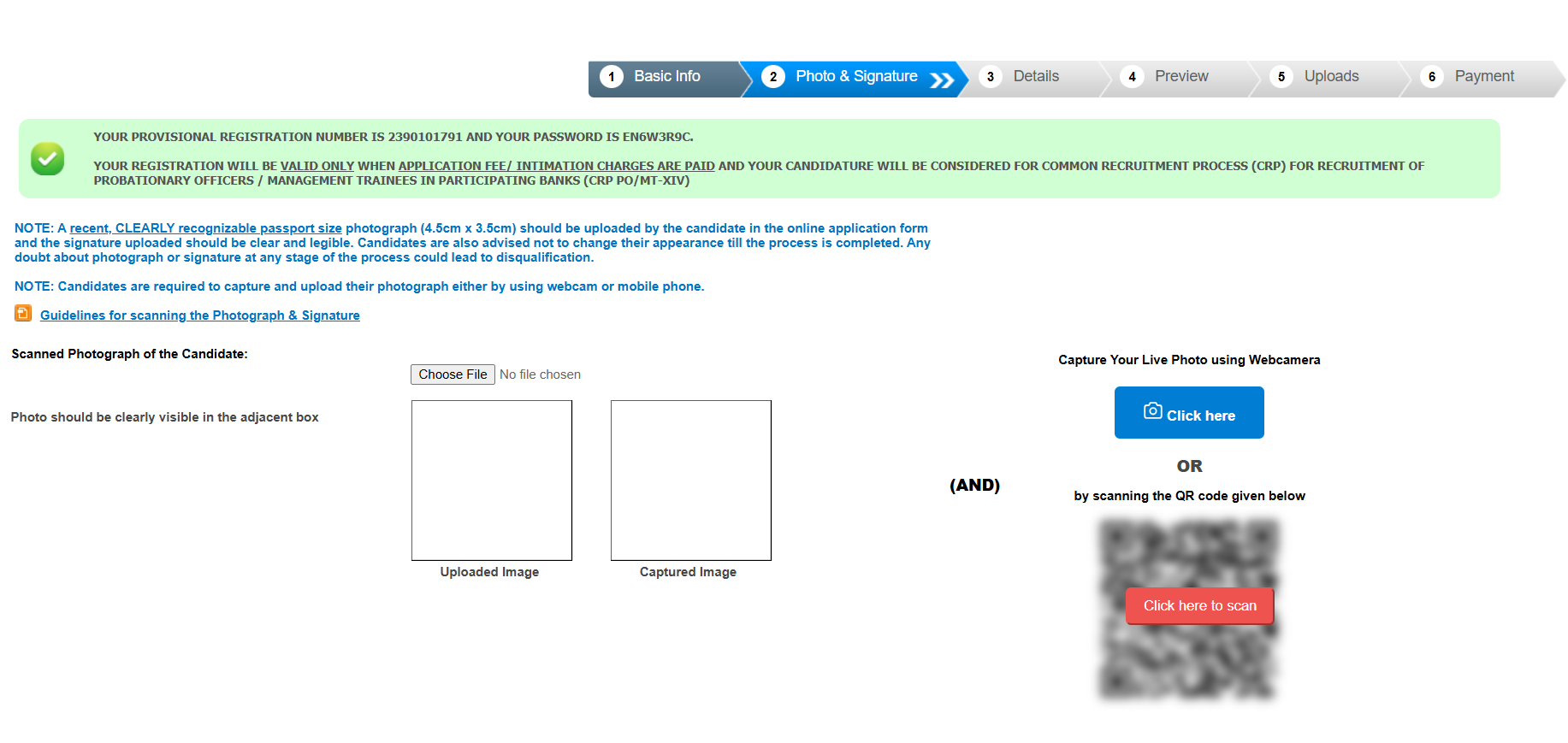
The candidates can click on the link mentioned below to go through the IBPS PO Live Photo Guidelines and other details.
Common Mistakes to Avoid While Filling the Application Form
Candidates should keep the following points in mind when applying for IBPS PO 2026:
- Using an inactive email ID or mobile number.
- Uploading blurred or incorrect document formats.
- Entering mismatched personal details.
- Waiting until the last day to apply.
- Choosing the wrong category.
- Not reviewing the application before submission.
- Forgetting to save the registration number.
IBPS PO Exam Pattern 2026
The selection process comprises Prelims, Mains, Personality Test, and Interview. Check out the exam pattern below.
Preliminary Examination
| Section | Questions | Marks | Time |
| English Language | 30 | 30 | 20 Minutes |
| Quantitative Aptitude | 35 | 35 | 20 Minutes |
| Reasoning Ability | 35 | 35 | 20 Minutes |
| Total | 100 | 100 | 60 Minutes |
Main Examination
| Section | Questions | Marks | Duration |
| Reasoning | 40 | 60 | 45 minutes |
| General/Economy/Banking Awareness/Digital/ Financial Awareness, including RBI circulars | 50 | 60 | 35 minutes |
| English Language | 40 | 20 | 35 minutes |
| Data Analysis & Interpretation | 40 | 60 | 45 minutes |
| Total | 170 | 200 | 160 minutes |
| Links Related to IBPS PO | |
| IBPS PO Online Coaching | IBPS PO Mock Test |
| IBPS PO Eligibility | IBPS PO Syllabus |
| IBPS PO Salary | IBPS PO Previous Year Question Paper |







 SBI Clerk Backlog Cut Off 2026 Out, Chec...
 SBI Clerk Prelims Scorecard 2026, Check ...
 SCI Court Master Recruitment 2026, Notif...