Table of Contents
The CSU Non Teaching Admit Card 2026 has been released by the Central Sanskrit University (CSU) for candidates appearing in the Non-Teaching Recruitment Examination. Candidates who successfully submitted their application forms can now download their hall tickets by logging into the official recruitment portal using their registration details.
In this article, we provide the latest updates on the CSU Non Teaching Hall Ticket, including the direct download link, steps to download, details mentioned on it, important instructions, and much more.
CSU Non Teaching Admit Card 2026 Out
The admit card contains important details such as the candidate’s name, roll number, exam date, reporting time, examination venue, shift timing, and exam-day instructions. Candidates are advised to verify all the information printed on the hall ticket immediately after downloading it.
The CSU Non Teaching 2026 written examination for various Non-Teaching posts is scheduled to be conducted on 5 July, 12 July, 26 July, and 9 August 2026, depending on the post applied for.
CSU Non Teaching Admit Card 2026: Overview
| Particulars | Details |
| Organization |
Central Sanskrit University (CSU)
|
| Exam Name |
CSU Non Teaching Recruitment Examination 2026
|
| Post Name |
Various Non-Teaching Posts
|
| Total Vacancies | 144 |
| Admit Card Status | Released |
| Exam Mode |
Offline (Written Examination)
|
| Exam Dates |
5 July, 12 July, 26 July & 9 August 2026
|
| Selection Process |
Written Exam, Skill Test (where applicable), Document Verification
|
| Official Website | sanskrit.nic.in |
CSU Non Teaching Admit Card 2026 Download Link
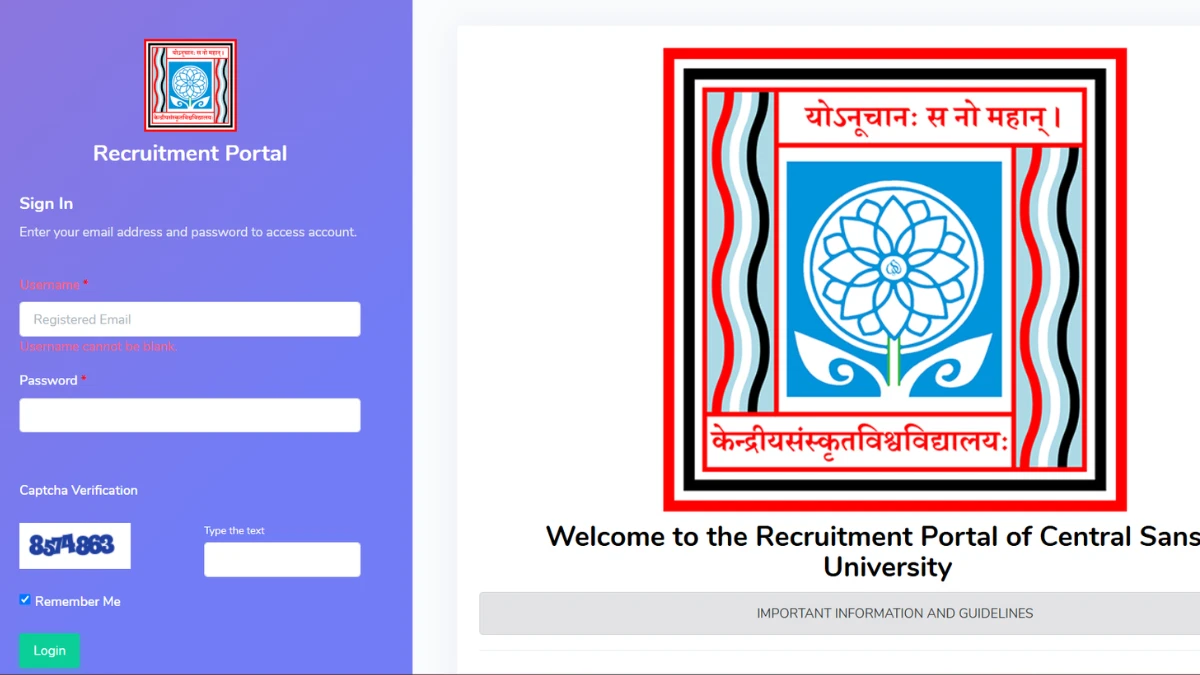
The Central Sanskrit University has activated the CSU Non Teaching Admit Card 2026 download link on its official recruitment portal. Candidates must log in using their registered email/mobile number and password to access their hall ticket. For the ease of candidates, we have provided the direct download link below:
CSU Non Teaching Admit Card 2026 Download Link (ACTIVE)
Steps to Download CSU Non Teaching Admit Card 2026
Candidates can follow the steps below to download their hall ticket:
- Visit the official website of Central Sanskrit University.
- Open the Recruitment or Non-Teaching Recruitment section.
- Click on the CSU Non Teaching Admit Card 2026 link.
- Enter your registered Email ID/Mobile Number and Password.
- Click on the Login button.
- Your admit card will appear on the screen.
- Download the hall ticket and take a clear printout for future use.
Details Mentioned on CSU Non Teaching Hall Ticket 2026
Candidates should verify the following information after downloading the hall ticket:
- Candidate’s Name
- Roll Number
- Registration Number
- Photograph and Signature
- Father’s/Mother’s Name
- Post Applied For
- Examination Date
- Shift Timing
- Reporting Time
- Examination Centre Name and Address
- Exam Day Instructions
Documents to Carry Along with the Admit Card
Candidates should carry the following documents to the examination centre:
- Printed copy of the CSU Non Teaching Admit Card 2026
- Original Photo Identity Proof (Aadhaar Card, PAN Card, Voter ID, Passport or Driving Licence)
- Two recent passport-size photographs (if mentioned in the instructions)
- Any additional documents specified by the university
Important Exam Day Instructions
Candidates should follow the important guidelines mentioned below:
- Reach the examination centre at least one hour before reporting time.
- Carry the printed admit card and valid photo ID proof.
- Do not carry mobile phones, smart watches, calculators, Bluetooth devices or any electronic gadgets.
- Follow all instructions issued by the invigilators.
- Preserve the admit card until the recruitment process is completed.






 Axis Bank Jobs 2026, Earn ₹6.8 LPA! De...
 SBI Clerk Previous Year Question Paper P...
 RRB NTPC Undergraduate CBT 2 Cut Off 202...