
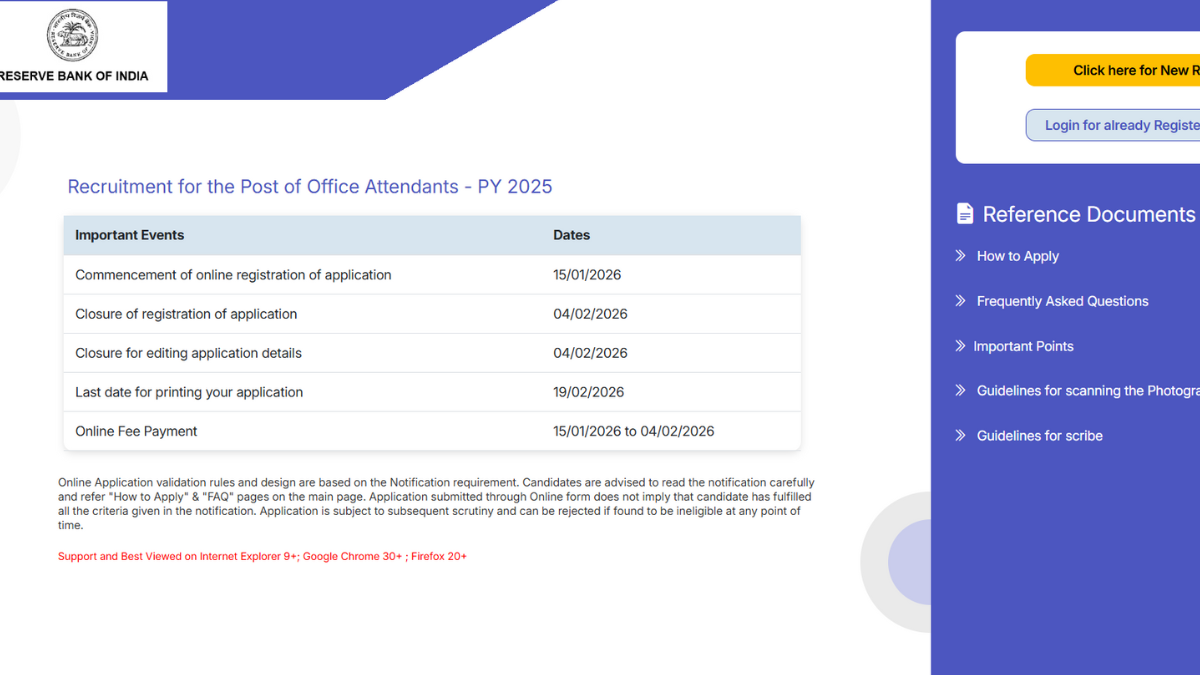
The RBI Office Attendant Apply Online 2026 window is closing today and those candidates who have not yet submitted their forms, must do so now. The online application process began on 15th January 2026 and 4th February 2026 (Today) is the last date to apply through the official website www.rbi.org.in.
With the deadline arriving today, aspirants are advised to apply immediately to avoid last-minute technical issues. Once the application window closes, no further submissions will be accepted.
RBI Office Attendant Apply Online 2026 – Last Date Reminder
The RBI Office Attendant recruitment is aiming to fill 572 vacancies for the post of Office Attendant across various regional offices in India. As per the RBI Office Attendant Recruitment 2026, candidates who are 10th pass and within the age of 18 to 25 years as of 01 January 2026 are allowed to apply.
Also, to simplify the application process, RBI has enabled DigiLocker integration, allowing candidates to directly fetch documents such as Aadhaar and educational certificates while filling out the form.
RBI Office Attendant 2026 Key Highlights
Before we dive into more details, refer to this table for key updates and information:
| RBI Office Attendant Apply Online 2026 Overview | |
|---|---|
| Organization | Reserve Bank of India |
| Post Name | Office Attendant |
| Total Vacancies | 572 |
| Application Start Date | 15 January 2026 |
| Last Date to Apply | 4 February 2026 |
| Mode of Application | Online only |
| Official Website | rbi.org.in |
| Selection Mode | Online Test + LPT |
| Fee Mode | Online |
RBI Office Attendant Apply Online 2026- Direct Link
Candidates can submit their applications through the recruitment section titled “Recruitment for the post of Office Attendant – PY 2025” on the official RBI website. The application process is completely online, and no offline forms are accepted.
Click to Apply: RBI Office Attendant Apply Online 2026 Link
How to Apply for RBI Attendant Post?
Candidates can follow these simple steps to apply online for this recruitment:
- Visit the RBI recruitment page.
- Click on “Click here for New Registration.”
- Enter your Name, Email ID, and Mobile Number.
- You will receive a Provisional Registration Number and Password.
- Log in using the credentials.
- Upload Photograph, Signature, Left Thumb Impression, and Handwritten Declaration.
- Fill in personal, educational, and communication details.
- Click Preview to verify.
- Click Complete Registration.
- Proceed to Payment.
- Submit and print the application form and e-receipt.
RBI Office Attendant Apply 2026: Handwritten Declaration Format
Candidates must upload a handwritten declaration in English only and in their own handwriting. The format is provided below:
“I, _______ (Name of the candidate), hereby declare that all the information submitted by me in the application form is correct, true and valid. I will present the supporting documents as and when required.”
RBI Office Attendant Application Fee 2026
The category-wise application fee details are as follows:
| Category | Charges |
|---|---|
| SC/ST/PwBD/EXS | ₹50 + 18% GST |
| GEN/OBC/EWS | ₹450 + 18% GST |
| RBI Staff | Nil |
Guideline for Photograph & Signature Scan and Upload
Candidates must ensure that all documents are scanned clearly in JPG/JPEG format at 200 DPI. The specifications are given below:
| Item | Size | Dimensions |
|---|---|---|
| Photograph | 20–50 KB | 200 x 230 pixels |
| Signature | 10–20 KB | 140 x 60 pixels |
| Left Thumb | 20–50 KB | 240 x 240 pixels |
| Handwritten Declaration | 50–100 KB | 800 x 400 pixels |
Live Photograph Capture Requirement
As per RBI guidelines, candidates are required to upload a live photograph during the application process. The photo can be captured using a webcam or by scanning a QR code via mobile phone. The image should be clear, passport-size, and taken against a light background.
Procedure for Uploading the Documents
While filling in the Online Application Form, the candidate will be provided with separate links for uploading the photograph, signature, left thumb impression, and handwritten declaration.
- Click on the respective link “Upload Photograph/signature/Upload left thumb impression/handwritten declaration”.
- Browse and select the location where the Scanned Photograph/signature/left thumb impression/handwritten declaration file has been saved.
- Select the file by clicking on it.
- Click the ‘Open/Upload’.
- If the file size and format are not as prescribed, an error message will be displayed.
- A preview of the uploaded image will help to see the quality of the image. In case of unclear/smudged, the same may be re-uploaded to the expected clarity/quality.

 RRB Paramedical Question Paper 2026, Che...
 MP Police SI PET PST Admit Card 2026 Out...
 JPSC Civil Services Exam Date 2026 Out F...

 Adda247 Job portal has complete information about all Sarkari Jobs and Naukri Alerts, its latest recruitment notifications, from all state and national level jobs and their updates.