
Table of Contents
The West Bengal Municipal Service Commission (WBMSC) has released the admit card for the Assistant Engineer Exam scheduled to be conducted on 1st February 2026 for candidates with a mechanical and electrical engineering background. The WBMSC 2026 Exam date has been released to shortlist a total of 23 Mechanical and Electrical engineers. The Admit Card for the Assistant Engineer CBT is available at the official website at @www.mscwb.org on 25th January 2026. This article provides a direct link to download the WBMSC AE Admit Card as it is activated, along with the steps on how to download it and other important exam day instructions.
WBMSC Assistant Engineer 2026 Admit Card Out
The WBMSC Assistant Engineer (Civil) Admit Card has been released on 25th January 2026 on the official website www.mscwb.org for candidates to view and download. The Admit Card is an important document that allows candidates to appear for the written test. Along with the admission pass, an identification proof is required at the entry of the exam hall. The link is now activated and applicants can download the hall ticket from the official link given below to ensure a smooth and hassle-free WBMSC Exam 2026 process for candidates.
WBMSC AE Admit Card 2026: Highlights
| West Bengal MSC Assistant Engineer 2026 Hall Ticket |
|
Admit Card
|
Exam Details
|
Important Application Dates
|
Selection Process
|
WBMSC Assistant Engineer 2026 Admit Card Download Link
The WBMSC Assistant Engineer Admit Card 2026 for the Mechanical and Electrical disciplines has been released on 25th January 2026 for the candidates to download their hall ticket from the official WBMSC website. Candidates must keep their roll number, registration number and other details ready for a smooth login. It’s best to download the WBMSC AE 2026 admit card at least 3-4 days before the exam to avoid last-minute website issues. Candidates can access the link to view and download the Assistant Engineer exam hall ticket below.
WBMSC Assistant Engineer 2026 Admit Card Download Link (Active)
How to Download WBMSC Assistant Engineer 2026 Admit Card?
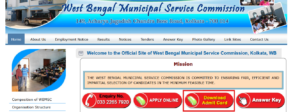
- Visit the official website of West Bengal Municipal Service Commission at https://mscwb.org/home/. On the home page, candidates will see many headers highlighted in red, such as Enquiry Number, Apply Online, Admit Card and Answer Key.
- Click on the Admit Card button. Candidates will be directed to a new page. On the new page, click on Download Admit Card.
- The page will display a list of notifications for which a written examination or interview is scheduled. Look for the relevant advertisement number mentioned in the notification. Here, it is Advertisement Number 13 of 2025.
- Under Advertisement Number 14/15 of 2025 for Mechanical/Electrical Assistant Engineer Exam, find the relevant notification. Click on the notification link to download the admit card as per the advertisement.
- A new page will open asking candidates to enter their post and application number. Select the required post and enter the application number. After that, candidates will get a preview of their admit card. Save the admit card on the desktop for the examination process.
What Steps to Follow if the WBMSC Assistant Engineer 2026 Admit Card Is Not Generated?
- Step 1: Check the official WBMSC website carefully to ensure that the admit card download link is active and you are accessing it within the notified schedule.
- Step 2: If the admit card is still not received or not generated, do not wait till the exam date and plan to visit the WBMSC office in person.
- Step 3: Carry a valid original photo identity proof, such as Aadhaar Card, Voter ID, PAN Card, Driving Licence, Passport, or Bank Passbook with a photograph for verification.
- Step 4: Bring two recent passport-size photographs, as these are mandatory for issuing a duplicate admit card.
- Step 5: Visit the Commission’s office only on the notified dates, that is, 15th and 16th January 2026 to avoid inconvenience.
- Step 6: Reach the office between 11:00 AM and 4:00 PM, as duplicate admit cards will be issued strictly within this time window.
- Step 7: Collect the duplicate admit card for the post of Assistant Engineer (Mechanical/Electrical) from the designated KMC office as mentioned in the official notice.
Details Mentioned on the Admit Card
The following information is provided on the admit card.
- Candidate’s name
- Roll number
- Registration Number
- Post name
- Discipline/Branch
- Venue Code
- Exam Centre Address
- Date and Time
- Exam Centre Name
- Reporting time
- Gate Closing Time
- Candidate’s photograph and signature
- Exam-day instructions and guidelines
- Signature of WBMSC Head
Key Points to Remember while Downloading WBMSC AE 2026 Hall Ticket
- Step 1: Visit the official website of the West Bengal Municipal Service Commission at www.mscwb.org as per the schedule announced by the Commission.
- Step 2: Avoid going on sites that are fake or harmful or store candidates’ data; carefully search the official web portal of the exam conducting authority.
- Step 3: Keep important details ready, such as roll number, registration number and password that will be needed to fill in to generate the admit card.
- Step 4: Download your e-Admit Card online, as no admit card will be sent by post or any offline mode.
- Step 5: Take a clear printout of the admit card and keep it safely for the examination and further stages.
- Step 6: Carefully note that your candidature is provisional and may be cancelled at any stage if eligibility conditions are not fulfilled.
Things to Carry to the Examination Hall
- Printed copy of Admit Card.
- Any original photo ID proof such as Aadhaar Card, PAN Card, Driving Licence, Voter ID and Passport
- Two passport-size photographs of recent times.
Things Not to Carry to the Examination Hall
- Electronic gadgets such as a mobile phone, Bluetooth device, and smartwatch.
- Books, Papers, Notes, or any Study material.
- Wallets, Bags, Purses, Study Material, Food Items, Water Bottles.
- Calculator, Digital Watch and any other item not mentioned in the Admit Card.
Exam Day Instructions mentioned in the WBMSC AE Admit Card 2026
- Report to the examination centre strictly as per the date, time and venue mentioned in the admit card.
- Carry a printed copy of the Admit Card with at least one original photo identity proof, such as Aadhaar Card, Voter ID, PAN Card, Driving Licence, Passport with photograph.
- Do not carry any prohibited items, including bags, baggage, mobile phones, calculators, watches, earphones, Bluetooth devices, pagers, or any electronic or communication gadgets, as these are strictly banned inside the examination premises.
- Cooperate during frisking at the entry points, which will be conducted separately for male and female candidates.
- Use only the black ballpoint pen provided by the Commission for filling the OMR answer sheet.
- Strictly follow all instructions given by the invigilators and the Examination Centre-in-charge throughout the examination.
- Be aware that any violation of examination rules or instructions may be reported and can lead to cancellation of candidature and debarment from future examinations and selections, as decided by the Commission.
- Note that absence at any stage of the recruitment process will result in automatic cancellation of candidature.
| Related Article | |
| WBMSC AE Syllabus 2026 | WBMSC Assistant Engineer (CE, ME, EE) PYQ |


 SSC JE Mains Admit Card 2026 Out, Downlo...
 NBCC JE Recruitment 2026, Apply Online F...
 BTSC Laboratory Assistant Recruitment 20...