Table of Contents
Numaligarh Refinery Limited (NRL) has officially released the answer key for the Graduate Engineer Trainee (GET) examination. This year, a total of 98 vacancies were announced across various disciplines, including Civil, Mechanical, Instrumentation, Electrical, and Metallurgy. The answer key has been issued for the online exam conducted on 7 December 2025 for both GET and Assistant Officer Trainee posts @nrl.co.in.
NRL GET Answer Key 2025 Out
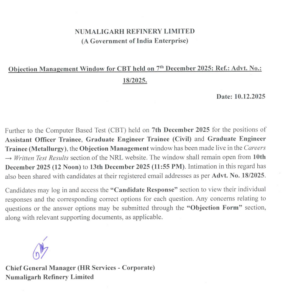
NRL has opened the Raising Objection window, allowing candidates who have checked their recorded responses to submit objections if they find any discrepancies. The objection window is active and will remain open till 13th December 2025. The candidates have been intimated on their personal email id and through SMS. Candidates can log in to their accounts and visit the “Candidate Response” section to check their individual responses along with the officially provided correct answers for each question.
NRL GET Answer Key 2025 Download Link
NRL has announced that candidates who appeared for the CBT on 7 December 2025 for Assistant Officer Trainee, GET (Civil) and GET (Metallurgy) can now raise objections to the answer key. NRL has also provided a direct link for candidates to check the answer key and submit their objections. Candidates simply need to log in using their credentials to access the portal. To make the process easier, the direct link to view the answer key and raise objections has been shared below.
NRL GET Answer Key 2025 Raise Objection Link
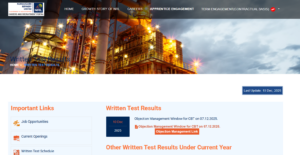
How to Download NRL Graduate Engineer Trainee Response Sheet?
-
Students must first visit the official NRL Careers web portal. In the Careers section, they should look for Job Careers and then navigate to Standard Forms.
-
Under Standard Forms, various important links will be available. From there, they should go to Written Test Results.
-
After clicking on Written Test Results, a new page will open displaying details related to the recent notification for the Computer Based Test (CBT). Under this notification, the Objection Management link/header will be highlighted.
-
Students must click on it, and they will be redirected to a new page. On this page, they have to enter their User ID, Password, and verification captcha.
-
After logging in, they can access their answer key and they can raise objections for any questions or answer options they feel are incorrect or are unsure about.

 NBCC JE Recruitment 2026, Apply Online F...
 BTSC Laboratory Assistant Recruitment 20...
 GSL Recruitment 2026 Out, Apply Online f...