
The PSC Thulasi Login 2026 portal is the online platform of the Kerala Public Service Commission (Kerala PSC) for candidates applying for various government jobs and recruitment examinations. Through the Kerala PSC Thulasi portal, candidates can complete One Time Registration (OTR), access their My Profile, apply for recruitment notifications, download admit cards, and check results.
Candidates must complete the One Time Registration process before applying for Kerala PSC recruitment notifications. Registered users can use their credentials to access the PSC Thulasi Login portal and manage their recruitment-related activities.
PSC Thulasi is the Kerala PSC candidate portal used for One Time Registration, profile management, job applications, admit cards, results, and other recruitment services.
Kerala PSC Thulasi Login 2026 – Active Link & Portal Overview
The Kerala Public Service Commission conducts recruitment for various posts in state government departments. The Thulasi PSC portal provides candidates with a single platform to manage their applications and other recruitment-related activities.
New users need to complete One Time Registration (OTR) and create their profile. Existing candidates can directly use the KPSC Thulasi Login facility to access their account.
KPSC Thulasi Login 2026: My Profile, Services & Other Details
The KPSC Thulasi Login allows registered candidates to access their personalised My Profile dashboard. Candidates can use the profile to manage their information and access available Kerala PSC recruitment services.
The PSC Thulasi My Profile may contain personal, educational and contact information submitted during One Time Registration. Candidates should ensure that their details are accurate before applying for a post.
| KPSC Thulasi Login 2026: Key Highlights |
Important Details
|
Important Links
|
Kerala PSC Thulasi Login Portal Link Register Now!
The KPSC Thulasi Login Portal is the official online platform of the Kerala Public Service Commission (KPSC). It is created to make the recruitment process simple and convenient for candidates.
Through this portal, candidates can easily register for government job notifications, apply online, download admit cards, check exam updates, and manage all recruitment-related information in one place. For the convenience of candidates, a direct registration link for the upcoming recruitments is provided below in the article.
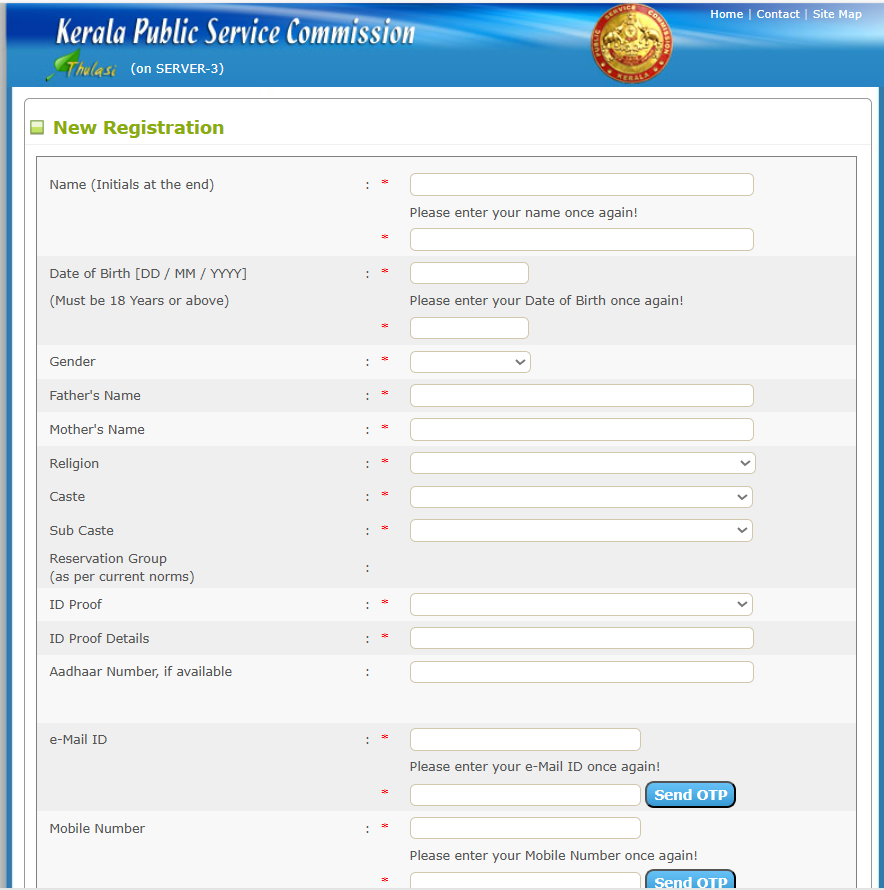
How to Complete Kerala PSC Thulasi OTR New Registration 2026?
Candidates who do not have a PSC Thulasi Login account must first complete One Time Registration. The process creates a candidate profile that can be used for Kerala PSC recruitment applications. Follow the steps below to complete Kerala PSC Thulasi Registration:
- Visit the official website: https://thulasi.psc.kerala.gov.in/thulasi/
- Click on “New Registration” on the homepage.
- Fill in your personal details: name, DOB, gender, ID proof, email ID, and mobile number.
- Verify your details using the OTP sent to your mobile number.
- A User ID will be created after successful validation.
- Upload the required documents as per instructions.
- Complete the five registration steps:
- Personal Details
- Communication Details
- Upload Photograph
- Upload Signature
- Preview & Submit
- After registration, log in using your User ID and password to access your profile.
- Use your Kerala PSC login credentials to apply for the PSC Thulasi recruitment notifications.
Mandatory Kerala PSC Thulasi Profile Updates 2026: Aadhaar Linking & Photo Rules
The KPSC has introduced important updates to its One-Time Registration (OTR) system for 2026. Candidates must ensure their profile details are completely updated before applying for any new notifications. Aadhaar linking is now mandatory for identity verification, especially for Gazetted and Police posts. Additionally, the PSC has set a 10-year validity rule for profile photographs.
- Aadhaar Linkage: Candidates must add their Aadhaar as “ID Proof” in the OTR profile for verification. Aadhaar linkage is now mandatory, especially for Gazetted and Police-related posts.
- 10-Year Photo Validity Rule: The profile photograph must be updated every 10 years. If the OTR photo was uploaded before 2016, candidates must upload a new photo with Name and Date; the “Apply Now” button may remain disabled.
Kerala PSC Thulasi My Profile 2026 – What You Can See and Do
The “My Profile” Page is the personalised dashboard you reach after logging into the Thulasi portal using your User ID, Password, and Access Code. Candidates can check the key aspects and details about the “My Profile” page:
- One-Time Registration (OTR): The profile is created through a one-time registration process, where candidates need to enter their personal, educational, and contact details only once.
- Information Displayed: The “My Profile” page typically displays all the details you provided during OTR, including:
- Personal information (Name, Date of Birth, Address, etc.)
- Educational Qualifications
- Contact details (Mobile number, Email)
- Uploaded Photograph and Signature
- Key Functions and Services: This page serves as a central hub for managing your applications and exam-related activities. You can:
How to Update Your Profile on Kerala PSC Thulasi Portal 2026
Candidates can update eligible information through the PSC Thulasi My Profile section. It is important to verify all details before applying for a recruitment notification.
- Visit https://thulasi.psc.kerala.gov.in/thulasi/
- Log in using User ID, Password, and Access Code
- Go to the “My Profile” section
- Select the section you want to update
- Edit details and upload updated documents (if needed)
- Review all information
- Click Save/Update to confirm changes
How to Apply for Kerala PSC Recruitment Using Thulasi Login Portal?
Candidates can apply for eligible Kerala PSC recruitment notifications through their PSC Thulasi account. The application facility is available after completing the required registration process.
- isit the official Thulasi Portal of the Kerala Public Service Commission at https://thulasi.psc.kerala.gov.in
- Complete One-Time Registration (OTR) if you are a new user
- Enter personal details, contact information, and create a User ID and password
- Upload a recent passport-size photograph and signature in the prescribed format
- Verify your registration using the OTP sent to your registered mobile/email
- Log in using your User ID, Password, and Access Code
- Update your profile with educational qualifications, address, and other required details
- Go to the “Notifications” section and select the desired post
- Click on “Apply Now” and verify the auto-filled details
- Upload additional documents if required
- Submit the application form
- Check the “Applied Posts” section to confirm application status
- Download hall ticket from the portal when released
What Are the Documents Required for Kerala PSC Thulasi OTR Registration 2026?
Candidates should keep their basic details and required documents ready before starting Kerala PSC Thulasi Registration. The exact requirements can vary depending on the recruitment.
Here’s a list of documents you’ll need:
- Recent passport-size photograph
- Scanned signature
- Aadhaar Card or any valid Photo ID proof (Voter ID, PAN, Driving License, etc.)
- SSLC / 10th certificate (for date of birth and education verification)
- Educational qualification certificates
- Community or caste certificate
- Domicile certificate (for Kerala residents)
- Email ID and mobile number for registration and OTP verification
Make sure the name, date of birth, and other details match your official records to avoid any verification issues later.
Features and Services Available on Kerala PSC Thulasi Portal 2026
The PSC Thulasi Portal provides candidates with several services related to Kerala PSC recruitment.
- Profile Management: Update your personal, contact, and educational details anytime.
- Job Applications: Apply online for the latest Kerala PSC job openings directly through your account.
- Admit Card Download: Quickly download admit cards for written tests and interviews.
- Result Checking: Check your exam results, shortlist status, and rank lists online.
- Notifications: Receive instant alerts for new vacancies, admit cards, and exam updates.
- Exam Confirmation: Confirm your participation for exams within the deadline to stay eligible.
Kerala PSC Thulasi Login Help Desk and Support
The Kerala PSC has a dedicated Help Desk and Support team to solve your queries. Candidates can get answers to their questions using phone calls, mail ID, or from the FAQ section.
- Helpline Number: You can call the Kerala PSC Thulasi helpline number at 0471-2546400, 0471-2546401, 0471-2447201, 0471-2444428, and 0471-2444438 for assistance.
- Email Support: candidates can contact through mail ID: keralapsc@keralapsc.org for support.
- FAQ Section: The Thulasi portal provides answers to the common FAQs so that candidates can get answers to basic questions in no time.
Forgot Kerala PSC Thulasi Login Password? Here’s How to Reset
If you have forgotten your Kerala PSC Thulasi Login password, follow these simple steps to reset it:
- Visit the official Thulasi Login portal
- Click on the “Forgot Password?” link on the login page.
- Enter your User ID and registered email/mobile number.
- Follow the instructions sent to your email or mobile to reset your password.
- Log in with the new password and continue accessing your account.
Keep your password secure and update it regularly to avoid login issues.
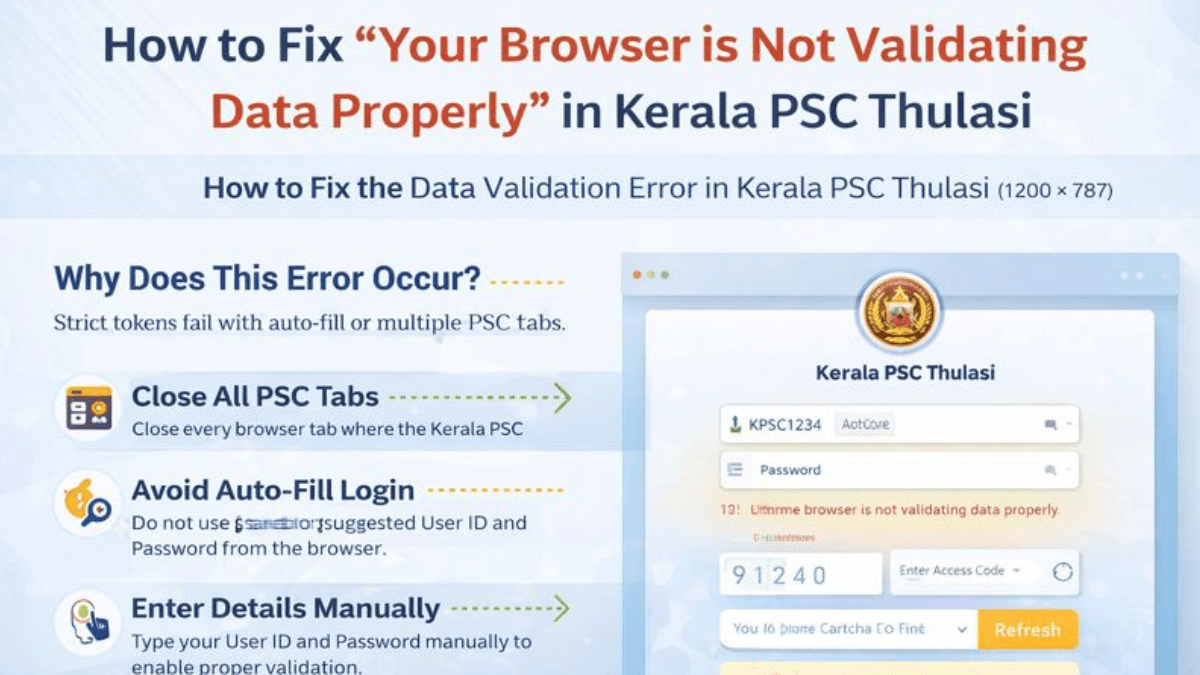
How to Fix Your Browser is Not Validating Data Properly?
Many candidates face the data validation error on the Kerala PSC Thulasi portal even after entering the correct login details. This issue occurs due to updated security settings that block auto-filled data or multiple active sessions.
Why Does This Error Occur?
The Kerala PSC Thulasi Login Portal now uses strict session rules which fail when auto-fill is used or multiple PSC tabs are open. That’s why we have provided the complete steps to rosolve the error in the article below
Steps to Fix the Data Validation Error (2026)
- Close every browser tab where the Kerala PSC website is open.
- Do not use saved or suggested User ID and Password from the browser.
- Type your User ID and Password manually to enable proper validation.
- Refresh the captcha once before clicking the Login button.
- If the error continues, log in using Incognito/Private mode to bypass cookies.
Kerala PSC Thulasi Login Mobile App
The Kerala PSC Thulasi Mobile App makes it easy for candidates to access Kerala Public Service Commission services right from their smartphones. It is available for free on the Google Play Store and brings all the main features of the Thulasi web portal in a mobile-friendly way.
With this app, users can log in to their accounts, update their profiles, apply for Kerala PSC exams, and receive alerts about upcoming exams, admit cards, and results. Its simple and user-friendly design makes the entire process smooth and convenient for all Kerala PSC aspirants.
Benefits of Kerala PSC Thulasi Portal
The Kerala PSC Thulasi portal provides a centralised platform for candidates managing their Kerala PSC recruitment activities.
- One-time registration for all Kerala PSC recruitments
- Easy online application submission
- Profile management
- Admit card download
- Online result checking
- Recruitment notifications
- Secure account management







 PSSSB Clerk Answer Key 2026 Out , Downlo...
 UKSSSC AAO Question Paper 2026 Out, Down...
 PSSSB Clerk Question Paper 2026 Out, Dow...




 Adda247 Job portal has complete information about all Sarkari Jobs and Naukri Alerts, its latest recruitment notifications, from all state and national level jobs and their updates.