
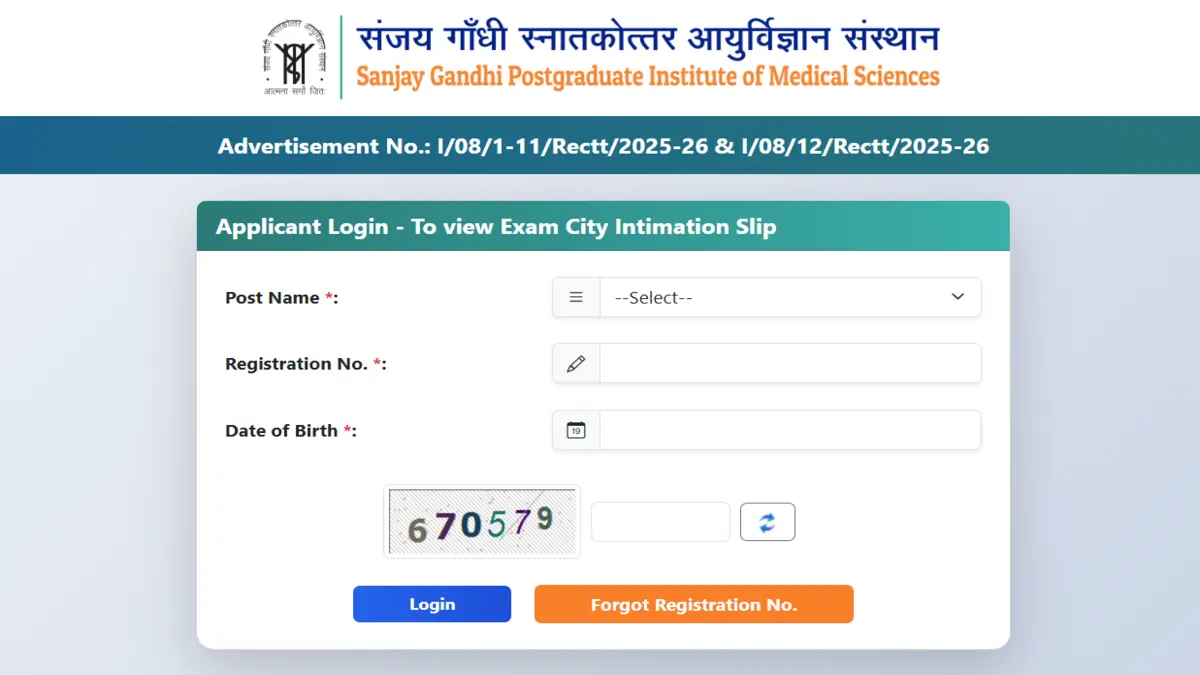
The Sanjay Gandhi Postgraduate Institute of Medical Sciences (SGPGIMS), Lucknow, has released the SGPGI Nursing Officer City Intimation 2026 for candidates appearing in the Recruitment Examination 2025-26. Candidates who have applied for the post of Nursing Officer (Sister Grade-II) can now check their allotted examination city through the official website. The city intimation slip has been issued ahead of the Computer-Based Test (CBT), which is scheduled to be conducted from 19 June to 23 June 2026.
SGPGI Nursing Officer City Intimation 2026 Live
Candidates are provided with the City Intimation Slip containing details regarding the allotted examination city and important instructions. The hall ticket will be released separately approximately 48 hours before the candidate’s allotted examination date.
According to the latest announcement, the SGPGI Nursing Officer City Intimation Slip 2026 has been made available on 7 June 2026.
SGPGI Nursing Officer City Intimation 2026 Overview
| Particulars | Details |
| Conducting Body |
Sanjay Gandhi Postgraduate Institute of Medical Sciences (SGPGIMS)
|
| Exam Name | SGPGI Nursing Officer Exam |
| Post | Nursing Officer (Sister Grade-II) |
| Total Vacancies | 1200 |
| Recruitment Name | SGPGIMS Recruitment Examination 2025-26 |
| Exam Dates | 19 June to 23 June 2026 |
| Mode of Examination | Computer-Based Test (CBT) |
| City Intimation Slip Release Date | 7 June 2026 |
| Official Website | sgpgims.org.in |
Download Link SGPGI Nursing Officer City Intimation PDF
The SGPGI Nursing Officer City Intimation Slip 2026 download link has been activated on 7 June 2026 on the official website of SGPGIMS. Candidates who successfully registered for the Recruitment Examination 2025-26 can now access their allotted examination city by logging in with their registration credentials. Candidates are advised to download the city intimation slip well in advance and make necessary travel arrangements before the CBT scheduled from 19 to 23 June 2026.
Download SGPGI Nursing Officer City Intimation PDF
How to Download SGPGI Nursing Officer City Intimation Slip 2026?
Candidates can follow these steps to access their allotted exam city:
- Visit the SGPGIMS recruitment portal.
- Under the “Application Portals” section, locate Advertisement No. I/08/1-11/Rectt/2025-26 & I/08/12/Rectt/2025-26.
- Click on the “View Exam City Intimation Slip” button available below the advertisement details.
- On the next page, again click on the “View Exam City Intimation Slip” option.
- Select “Nursing Officer” from the list of posts.
- Enter your Registration Number, Date of Birth, and the Captcha Code displayed on the screen.
- Click on the Login button to access your dashboard.
- Download and save the SGPGI Nursing Officer City Intimation Slip 2026 for future reference and make necessary travel arrangements accordingly.
Details Mentioned on SGPGI Nursing Officer City Intimation Slip 2026
The city slip is expected to contain the following information:
- Candidate’s Name
- Registration Number
- Post Applied For
- Examination City
- Examination Dates
- Important Instructions for Candidates
Candidates are advised to verify all details carefully and make necessary travel arrangements in advance.
What to Do If You Forgot Your SGPGI Nursing Officer Registration Number?
Candidates who are unable to remember their registration number can retrieve it through the SGPGIMS recruitment portal by following these steps:
- Visit the SGPGIMS recruitment portal.
- Under the “Application Portals” section, locate Advertisement No. I/08/1-11/Rectt/2025-26 & I/08/12/Rectt/2025-26.
- Click on the “View Exam City Intimation Slip” button.
- On the next page, again click on “View Exam City Intimation Slip”.
- Select the “Forgot Registration No.” option.
- Choose “Applicant’s Name” as the retrieval method.
- Enter the following details:
- Applicant’s Name
- Father’s Name
- Mother’s Name
- Date of Birth
- Fill in the Captcha Code displayed on the screen.
- Click on Submit.
After successful verification, the SGPGIMS portal will send the registration details to the candidate’s registered email ID or mobile number. Candidates can then use the recovered registration number to log in and download their SGPGI Nursing Officer City Intimation Slip 2026.




 RRB Nursing Superintendent Recruitment 2...
 RRB Pharmacist Recruitment 2026 Notifica...
 RRB Section Controller City Intimation S...


 Adda247 Job portal has complete information about all Sarkari Jobs and Naukri Alerts, its latest recruitment notifications, from all state and national level jobs and their updates.