






Correct option is B
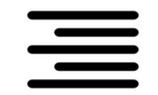
The icon shown in the question represents
Right Alignment in MS Word 365. When this option is selected, text is aligned to the
right margin, leaving the left margin uneven.
Important Key Points:
1.
Right alignment is often used for specific formatting, such as aligning dates or signatures in a document.
2. The alignment ensures all text lines up neatly on the right-hand side.
3. This option can be quickly applied using the shortcut
Ctrl + R.
Knowledge Booster:
·
Justifying: Aligns text evenly between the left and right margins, creating a clean block appearance.
·
Centre of text: Aligns text to the center of the page, leaving both margins uneven.
·
Left alignment: Aligns text to the left margin, leaving the right margin uneven.
 English
 100 Questions
 200 Marks
 60 Mins


