






Correct option is B
To convert a color image to grayscale, a common method is to
average the values of the red, green, and blue (RGB) channels for each pixel. The grayscale value for a pixel is calculated as:

This method provides a simple and effective way to create a grayscale representation of the image. Other weighted methods (e.g., luminosity) are often used for more accurate results based on human perception, but averaging is a fundamental approach.
Example:
Here's a simple algorithm to convert an RGB image to grayscale using the averaging method:
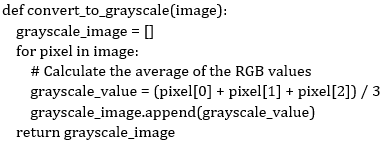
This method ensures that the grayscale image retains the brightness and contrast of the
original color image by averaging the contributions of all three color channels.
Important Key Points:
1.
Averaging RGB Values:
· This method takes the arithmetic mean of the red, green, and blue color channels for each pixel.
· It produces a neutral grayscale image but does not account for the human eye's sensitivity to different colors.
2.
Grayscale Representation:
· A grayscale image contains shades of gray ranging from black (0 intensity) to white (maximum intensity), where all three channels (R, G, B) have the same value.
3.
Practical Applications: Grayscale conversion is commonly used in image preprocessing, machine learning, and computer vision tasks to reduce computational complexity.
 English
 35 Questions
 35 Marks
 20 Mins


