






Correct option is C
Inline CSS is applied directly to an HTML element using the style attribute. In the given options:
· Option (c) is correct because the style attribute is used within the HTML tag to define CSS properties (color: blue;).
· Other options refer to external stylesheets, internal CSS, or class-based styles, which are not inline CSS.
Important Key Points:
1.
Inline CSS: Inline CSS applies styles directly to an HTML element using the style attribute inside the tag. For example:
<p style="font-size: 14px; color: red;">This is a paragraph</p>
2.
Advantages of Inline CSS:
1. Quick and easy to apply for small or unique styling needs.
2. Doesn’t require separate files or <style> blocks.
3.
Disadvantages of Inline CSS:
1. Difficult to maintain in large projects.
2. Violates separation of concerns (HTML for structure, CSS for styling).
3. Reduces reusability and scalability.
4.
Alternatives to Inline CSS:
1.
Internal CSS: Defined within the <style> tag in the <head> section.
2.
External CSS: Linked using a <link> tag to an external .css file.
Knowledge Booster:
·
External CSS Example:
<link rel="stylesheet" href="styles.css">
Used to apply CSS from an external file for global styling.
·
Internal CSS Example:
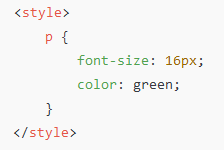
Used within the <head> section to apply CSS rules to elements in the document.
·
Class-Based CSS Example:
<h1 class="blue-heading">This is a heading</h1>
Uses a class selector defined in either internal or external CSS.
 English
 100 Questions
 100 Marks
 60 Mins


