






Correct option is A
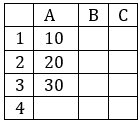
The correct answer includes the formulas that correctly add the values from cells A1, A2, and A3 (i.e., 10 + 20 + 30 = 60). Statements A, C and D perform this addition accurately. Other statements are incorrect due to either syntax error or omission of a cell.
Information Booster:
1. Formula A: =SUM(A1:A3)
o This uses the range notation, which adds all the values from A1 to A3, inclusive.
o Correct and efficient.
2. Formula C: =A1 + A2 + A3
o This is a direct arithmetic operation that explicitly adds the three individual cells.
o Also correct and accurate.
3. Formula D: =SUM(A1, A2, A3)
o This uses comma-separated arguments in the SUM function.
o All listed cells are summed, making this correct.
Additional Knowledge:
• Formula B: =SUM(A1, A3)
o This omits A2, so the result would be 10 + 30 = 40.
o Hence, it’s incorrect for summing A1 to A3.
• Formula E: =SUM(A1–A3)
o This is syntactically incorrect in Excel. The dash – implies subtraction, and ranges are not defined this way.
o Excel does not recognize A1–A3 as a valid range or operation.
 English
 10 Questions
 20 Marks
 12 Mins


