






Correct option is E
The correct answer is
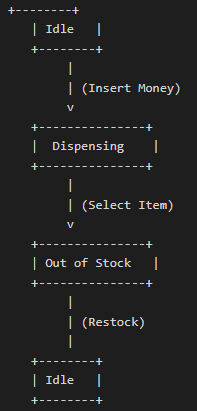
(e) Insert Money → Select Item. This sequence transitions the vending machine from the
Idle state to the
Dispensing state and then to the
Out of Stock state, as shown in the diagram.
Important Key Points:
1.
State Transition Flow: The vending machine starts in the
Idle state. Upon
inserting money, it moves to the
Dispensing state. Once an
item is selected, the machine transitions to
Out of Stock.
2. The machine reaches the
Out of Stock state after an item is dispensed if no further items are available, indicating that it can no longer serve requests until restocked.
Knowledge Booster:
·
Restock Event: When the machine is in the
Out of Stock state, the
Restock event transitions it back to the
Idle state, indicating that items have been replenished.
·
Incorrect Sequences:
·
Insert Money → Select Item → Restock: This sequence returns the machine to the
Idle state after restocking, without remaining in the
Out of Stock state.
·
Insert Money → Select Item → Insert Money: Once the machine is in the
Out of Stock state, inserting money will not change its state until restocked.
·
Insert Money → Select Item → Select Item: After selecting an item and reaching the
Out of Stock state, a second "Select Item" action is not possible.
·
Select Item → Insert Money → Select Item: The sequence is incorrect as the machine must be in the
Idle state before money is inserted.
 English
 100 Questions
 100 Marks
 60 Mins


