






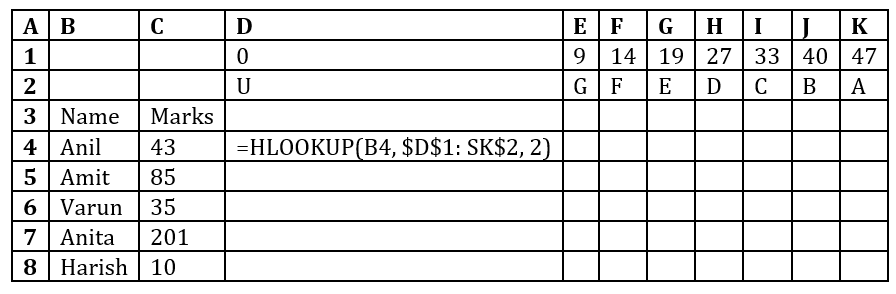
Correct option is D
Formula: =HLOOKUP(B4, $D$1: $K$2, 2)
Range: C4 : C8
The HLOOKUP function searches for the value in B4 (in this case, 43) in the first row of the range $D$1:$K$2 and returns the corresponding value from the second row. Since the formula is copied down, the marks in each row (e.g., B5, B6) will be searched in the first row of the range, and the matching second-row value will be returned.
Values returned:
1. C4: B
2. C5: A
3. C6: C
4. C7: E
5. C8: G
 English
 10 Questions
 20 Marks
 12 Mins


